E-file Wage Payment Rpt JPN Page
Use the E-file Wage Payment Rpt JPN process to retrieves each employee's Reporting Municipality Code based on Municipal Code (that is Payment Municipality Code) of the employee.
Navigation:
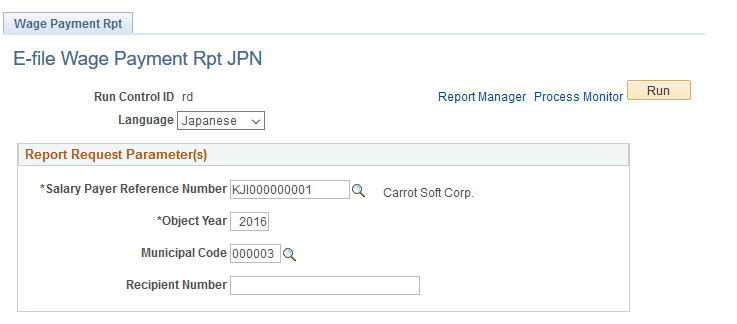
This example illustrates the fields and controls of E-file Wage Payment Rpt JPN page.
Note:
The wage summary payment report and the wage payment paper report will have order by on reporting municipal code, The Wage Payment summary Report will show Reporting Municipal codes in the Report.
The changes to the wage payment report as part of My Number Act implementation are as follows:
-
Employee personal Number is displayed on the report.
-
Count of dependents, count of disabled dependents, count of non-resident employees.
-
List of dependents (Maximum count = 4) with their person number along with the non-resident flag circled.
-
If the count of dependents is more than four, the remaining dependents (non-juvenile) name along with text non resident (if the dependent is a non-resident) is displayed in the section above insurance values and Person number is displayed to the right of juvenile dependents section
-
If the count of Juvenile dependents is more than 4, the remaining dependents'(juvenile) name along with text "non resident" (if the dependent is a non-resident) is displayed in the section above insurance values and Person number is displayed to the right of juvenile dependents section below the Person numbers of the EXTRA Non-Juvenile Dependents.
-
The Corporate number of the establishment is displayed along with address and phone number.