Setting Up Element Segmentation
During implementation, consider which of your elements require element segmentation. It's important that you review the design of your primary and supporting elements and add the correct elements to the Segmentation Event Definition page. If element segmentation is not defined correctly, you may have some elements that are not resolved correctly because associated supporting elements are not sliced. Here are some guidelines to explain how element segmentation works:
-
Primary elements (earnings and deductions) that you add to the Segmentation Event Definition page are resolved once per slice.
-
Supporting elements that you add to the Segmentation Event Definition page are resolved once per slice.
-
When you add a primary element to the Segmentation Event Definition page, the supporting elements that are used in the definition of that primary element are also resolved for each slice.
-
When you add a primary element to the Segmentation Event Definition page, the accumulators to which the element contributes are also resolved for each slice.
However, if your accumulators have user keys you need to ensure that these are resolved per slice. You may need to add supporting elements to the Segmentation Event Definition page to ensure that all of the necessary elements are resolved.
To illustrate the importance of adding the correct supporting elements, consider the example trigger event ID that PeopleSoft delivers for UK element segmentation (select ):
This example illustrates the fields and controls on the Segmentation Event Definition page.
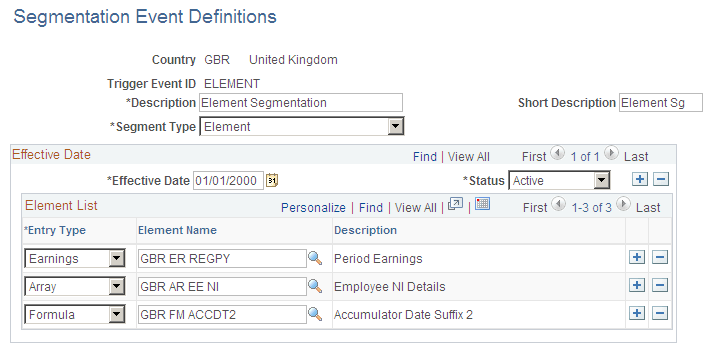
The earning element GBR ER REGPY is the primary element that requires element segmentation. The array GBR AR EE NI and the formula GBR FM ACCDT2 appear on this list because they are used to resolve the user keys of the accumulator GBR AC NIBL PTD to which GBR ER REGPY contributes.
If the array and the formula were not on this list, the NI category and the hire date would not be resolved for each slice. This would lead to incorrect NI calculations and accumulators without a hire date.
When you have set up the Segmentation Event Definition page for element segmentation, define the trigger definition that links element segmentation to the relevant record. PeopleSoft delivers a trigger for the COMPENSATION record so that if an employee's compensation is modified, element segmentation is triggered.