Approval Framework and Absence Management
PeopleSoft Absence Management delivers the AbsenceManagement Process ID. You can add multiple Approval Definition IDs to the Approval Process ID. You can link multiple approval scenarios. One may be self-approved; while another can be one, two or more levels of approvals using approvers in one or in multiple user lists to a single Approval Process ID. This functionality allows you to simplify your approval scenarios and reduce the maintenance to multiple Approval Process IDs.
Approvals for Self-Service and Extended Absence Requests
The system uses the following delivered Approval Definition IDs for self-service and extended absence requests:
-
AbsenceMgmtByDeptManager
-
AbsenceMgmtByPosMgmt
-
AbsenceMgmtByPosnDeptMgr
-
AbsenceMgmtByPosnSupervisor
-
AbsenceMgmtBySupervisorId
-
AbsenceBySupervisorMulti
When the originator of an absence event submits the request, the system checks to see if approvals are being used based on the Administrative Rules defined on the Configure Country Take Setup - Absences Page. If no approvals are needed then the Approval Process ID and Approval Definition ID fields on the Absence page will be left blank, or you can setup your own Approval Definition ID to make your events self and auto-approved. If values are entered for these fields the approvals process is initiated.
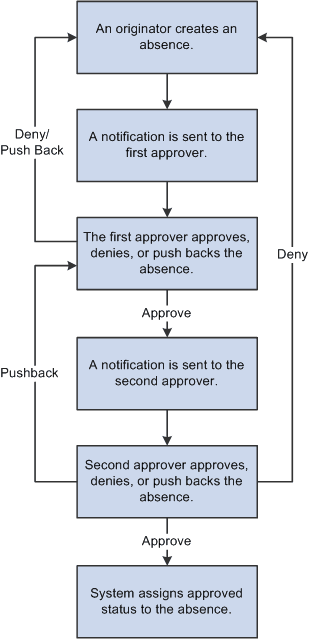
The first step in the approval process is to identify the first person to approve the transaction. This person is based on the Approval Process definition. If the system identifies this person, the system sends a notification indicating that there is an absence awaiting for approval. The approver has the option to:
-
Approve the absence. The system sends a notification to the next person in the approval process, if one is indicated.
-
Deny the absence. The system terminates the approval process. The originator of the absence will receive notification indicating the absence has been denied.
-
Push back the absence. The originator of the absence will receive a notification indicating the absence needs their attention.
Note:
Push Back is a valid action for the approver before the absence has gone through the first approver in the approval path. Once the second or subsequent approver has pushed back the absence, the first approver should deny it instead of pushing back the absence. It is recommended for the first approver to always state the reason in the comment field when denying an absence.
If the system cannot identify the first approver, it moves to step two of the approval process.
A subsequent step in the approval process (if multiple levels of approvals were defined), is to identify the next person to approve the absence , if one is indicated. If the system identifies the next approver, the system sends a notification to the approver telling them there is an absence needing their approval. The next approver has the option of:
-
Approving the absence . The system updates the status of the absence event to approve and ends the approval process.
-
Denying the absence . The system ends the approval process. The originator of the absence event will receive notification indicating the absence event has been denied.
-
Push back the absence . The system sends a notification to the first approver associated with the absence event and notifies that person that the absence event needs their attention.
If neither approval steps are met, the system automatically submits a notification to the approval administrator telling the administrator there is an absence event requiring their attention.
This diagram illustrates the approval process flow.
Note:
The only delivered approval process with two levels of approval is the AbsenceManagement approval process ID. The others only have one level of approval. If the delivered approval processes do not meet your organizational needs you can create your own approval process ID, or add more steps to any of the approval definitions IDs that better fits your company policies.
Approvals for Absences Entered by Administrators
The system uses the following delivered Approval Definition IDs for approvals entered by Administrators using the Create and Maintain Absence Requests Page:
-
AbsenceMgmtByDeptManager
-
AbsenceMgmtByPosMgmt
-
AbsenceMgmtByPosnDeptMgr
-
AbsenceMgmtByPosnSupervisor
-
AbsenceMgmtBySupervisorId
-
AbsenceBySupervisorMulti
-
Administrator-AutoApprove
-
Administrator_RouteTo
Administrators select one of four Submit Options when submitting absence requests:
-
Approve Automatically: This option uses the Administrator-AutoApprove approval definition to approve submitted absence requests automatically.
-
Route to An Operator ID: This option uses the Administrator_RouteTo approval definition to route submitted absence requests to a specific approver.
-
Route To A Role: This option uses the Administrator_RouteTo approval definition to route submitted absence requests to a specific role.
-
Use Absence Name Default: This option routes submitted absence requests according to the approval process and approval definition defined for the absence take on the Configure Country Take Setup - Absences Page.