Country-Specific Processing
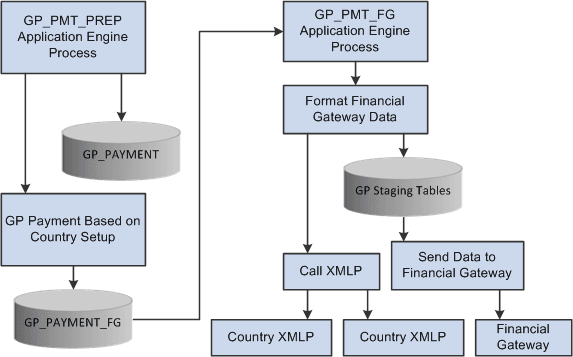
Global Payroll provides a flexible, generic banking framework that enables organizations with multinational operations to use PeopleSoft Financial Gateway as a single point of distribution for all of their payments. You define application packages and SQL statements for each country in your organization. The existing banking process, GP_PMT_PREP, uses this country-specific setup to generate country-specific payments. The Payment for FG (GP_PMT_FG) process sends the country-specific payments to PeopleSoft Financial Gateway.
PeopleSoft Financial Gateway sends a message to the HCM database when an error occurs that displays the status in the Payment Transactions page of the Results by Calendar Group component in PeopleSoft Global Payroll. This streamlines the maintenance of the Financial Gateway Payment Preparation table. You can view more information in the Payments transactions page through multiple tabs and are able to review errors from Financial Gateway in the Errors tab.
This topic discusses:
-
Country-specific data process flow.
-
Country-specific setup requirements.
-
Country-specific batch processing.
-
Integration with PeopleSoft Financial Gateway.
Country-Specific Data Process Flow
The process flow for country-specific payments is slightly different than the regular banking process flow.
This diagram illustrates the process flow for country-specific data.
Country-Specific Setup Requirements
In addition to the normal banking setup requirements, to process country-specific payments you must also:
-
Define application packages for a country on the Banking Country Setup Page.
-
Generate a country-specific SQL statement on the Banking Preparation Definition Page.
-
Define payment process settings on theInstallation Settings Page.
-
See PeopleTools: Integration Broker Service Operations Monitor product documentation for both Global Payroll and Financial Gateway.
-
See Setup Prerequisites.
Country-Specific Batch Processing
You process country-specific payments using the same Global Payroll Banking Process (GP_PMT_PREP) that you use for non-country-specific banking. When a row of data exists for a country on the Banking Country Setup component, however, GP_PMT_PREP executes country-specific logic.
If the country uses the delivered CORE_BANK:SQL application package, then the system references the banking preparation definition for that country and for each defined sequence processes the country-specific SQL statement using the country, calendar run ID, and employee ID range selected on the Run Payment Prep Process run control page. The system loads the results into the GP_PAYMENT_FG record.
If the country does not use the delivered CORE_BANK:SQL application package, then the system uses the application package defined for the country in the Banking Country Setup component to load results into the GP_PAYMENT_FG record for the country, calendar run ID, and employee ID range selected on the Run Payment Prep Process run control page.
Integration with PeopleSoft Financial Gateway
PeopleSoft Global Payroll enables you to send generated payment details from PeopleSoft Global Payroll to PeopleSoft Financial Gateway. Financial Gateway then dispatches the payments to banks.