Currency in Batch Processing
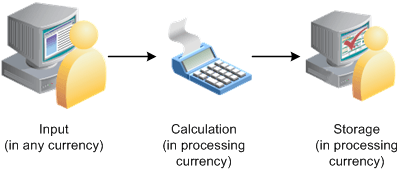
Here are the steps that take place during batch processing with regard to currency conversion:
-
The user enters monetary amounts into the system in any type of currency that the user chooses.
-
The system calculates exchange rates and converts amounts into a single processing currency (the processing currency that is defined at the pay entity level).
If it cannot find an associated currency code for a monetary value, the element is not resolved and the payment is placed in error.
The batch processes use a standard PeopleSoft currency conversion application that does the conversion and passes back the corresponding numerator and denominator to be applied against the input currency. The processes also handle triangulation.
For calculation, any value (for example, an accumulator value) that is being retrieved from a previous period, and is stored in a different currency, is converted into the current processing currency using the current period's exchange rate type and effective date.
-
The system performs calculations, using the processing currency, and stores the results in the processing currency in the PINV array.
-
The system stores the calculation results in the processing currency in the appropriate tables. It does not store the exchange rate that is used for currency conversions, the numerators and denominators that are used in the batch currency conversion program, or the original source input monetary value and currency code.
If the batch process cannot find an associated currency code for a monetary field (that is, the field is blank or the currency code is not valid), the system cannot resolve the element and puts the payment in error.
Note:
To find the original source input monetary value and currency code for a calculation, look in the input source tables.
This flowchart illustrates how currency is managed during batch processing.