Daily Data
When you run the Take process, one of the first things the program does is expand each absence event in the process list that occurred for a payee during the absence processing period (or current segment, if the processing period is segmented). Expanding the event means that the system creates a detailed row of data for each day of the absence in the GP_RSLT_ABS record. We call these rows daily data.
The Take process expands each event that includes a date in the current segment. It creates a row for each day of the absence event, including days that fall outside the processing period. The system also populates the work schedule and holiday schedule system elements for the day before and after the absence, if the payee was not absent on those days. If the payee was absent the day before or the day after the reported absence, other absence-related system elements can be populated, depending on your rules.
For example, assume that the processing period is May 1 to 31, and there is no segmentation. If the payee is absent from May 5 to May 6 and again from May 29 to June 2, the Take process creates two rows of daily data for the first absence and five rows for the second absence.
This diagram illustrates how the system creates daily data for each day of an absence event.

Even though the system creates a row of daily data for each day of an absence event, this does not mean that each day is processed. The entire event is expanded so that the system has all the information it needs to accurately evaluate each absent day. Only those days that occurred during the processing period are processed. Using the above example, the system would process the following absent days: May 5, 6, 29, 30, and 31.
Sources of Daily Data
Data that populates the daily data row initially comes from two sources:
-
The payee's work and holiday schedules, which provide the day of the week, scheduled hours, and holiday type.
-
The absence event, which provides the absence take, begin and end dates, partial days absent, if applicable, and other information.
This diagram illustrates the sources of daily data:
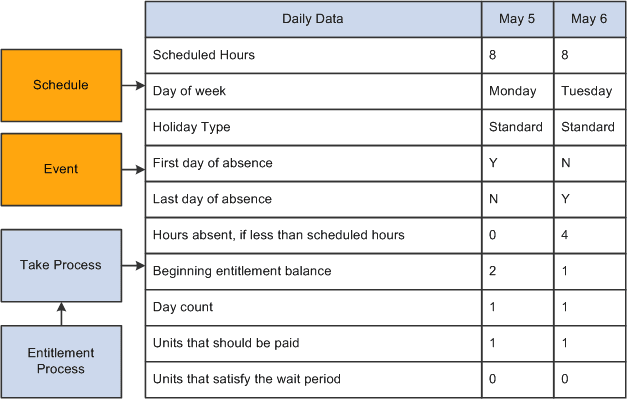
The Take process also contributes to the daily data. When it applies the absence rules—defined by your absence elements—to the event and schedule data, it derives a set of results that populates the daily data. The results include the beginning entitlement balance, absent units, paid and unpaid units, ending balance, and other information.
The day formula, which you create and assign to your take rule, is what drives the results. This formula interprets each day of the absence and returns the number of units that the absent day represents; for example, four hours or one day. Once the system knows the absence day count, it can compare the count to the entitlement balance, determine whether a wait period or any other requirements for payment have been met and determine whether any part of the absent day should be paid. It can also calculate the ending entitlement balance.