Instances and Bundling
This topic provides an overview of positive input entry instances and bundles.
Instances
Positive input entries are also called instances. When entering positive input into the system manually, you assign an instance number to each entry. So, if a payee works overtime at three rates and you make three separate entries of positive input for the OVERTIME element, each entry has a different instance number. The following example assumes that the calculation rule is (Overtime) = (Rate) × (Units)
| Element | Instance | Rate × Units |
|---|---|---|
|
Overtime |
1 |
25 × 10 |
|
Overtime |
2 |
35 × 5 |
|
Overtime |
3 |
30 × 5 |
When positive input comes from external sources, the system assigns instance numbers. Whether the system assigns a separate instance number to each entry of positive input or to a group of entries depends on whether bundling occurred.
Bundling
Positive input created by the Absence Take process, Time and Labor, or a third-party application is often bundled by pay period into an array, for more-efficient processing. If a payee works eight hours a day on a weekly pay frequency, five eight-hour entries can be bundled into one 40 hour entry. Bundling has no impact on processing or results other than that it creates a single row of output (GP_RSLT_ERN_DED) instead of multiple rows.
Each bundle receives an instance number. Instance numbers begin with 1 and are assigned to each bundled element in a calendar run.
Rules for bundling data depend on the positive input source.
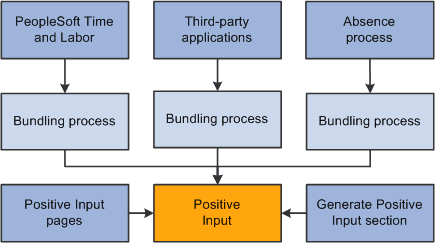
This diagram illustrates the sources of positive input and bundling.
Bundling Rules for Time and Labor
Positive input entries received from Time and Labor (called payable time in that application) are bundled by slice or segment when they contain compatible data—that is, when the values for the following types of data are identical:
-
Rate.
-
Currency.
-
Rate as of date.
-
Task entities*.
* To be considered for bundling, selected task entities defined in Time and Labor—including business unit, product, and department—must be mapped to system elements or variable elements in Global Payroll using the Mapping page.
Example 1
A payee has five positive input entries, one for each weekday. Each entry specifies a rate value as in the table. The rate earned every day except Thursday is the same. Therefore, the system bundles and creates one instance for the four days with a rate of 10 and creates a separate instance for Thursday, with a rate of 12:
| Day | Hours Worked | Rate |
|---|---|---|
|
Monday |
8 |
10 |
|
Tuesday |
4 |
10 |
|
Wednesday |
8 |
10 |
|
Thursday |
8 |
12 |
|
Friday |
8 |
10 |
Example 2
A payee performs work in two departments. The positive input entries include a system element that defines the department (A or B) and a variable element that specifies the hours worked. Because the system elements must match for bundling to occur, the system bundles all entries for department A and creates another bundle for the department B entries:
| Day | Variable | System Element |
|---|---|---|
|
Monday |
8 |
Department A |
|
Tuesday |
8 |
Department A |
|
Wednesday |
8 |
Department B |
|
Thursday |
8 |
Department B |
|
Friday |
8 |
Department A |
Bundling Rules for Absence Take
Positive input that's created by the Absence Take process and that falls in the same slice or segment can be bundled, depending on the take element definition:
-
If you didn't select the Multiple Instances option for the take element, positive input for absences taken for the same reason during the pay period is bundled.
-
If you allocated the positive input associated with an absence take element to more than one earning or deduction element (on the Absence Take - Day Formula page), the system bundles the positive input for each earning and deduction element separately.
Bundling Rules for Third-Party Applications
Positive input received from third-party applications can be bundled or unbundled, depending on the bundling group tag assigned to each instance before transmission to Global Payroll. The third-party application must use a unique value for the Source (PI_SOURCE) field and handle any segmentation requirements. It is the responsibility of the third-party interface to bundle entries as required by Global Payroll.