Overrides Available for Supporting Elements
Eight override levels enable you to control the values of brackets, dates, duration, formulas, and variables:
-
Pay entity overrides.
-
Pay group overrides.
-
Payee overrides: Override the value of a bracket, date, duration, formula, or variable element whenever it's resolved for the payee.
-
Payee/Element overrides. Overrides the value of a variable used by a specific earning or deduction assigned to a payee.
-
Pay calendar overrides.
-
Via element overrides.
-
Element definition overrides.
-
Positive input overrides.
This diagram illustrates the sequence in which the system applies overrides when it encounters multiple overrides for a supporting element. It begins with pay entity overrides.
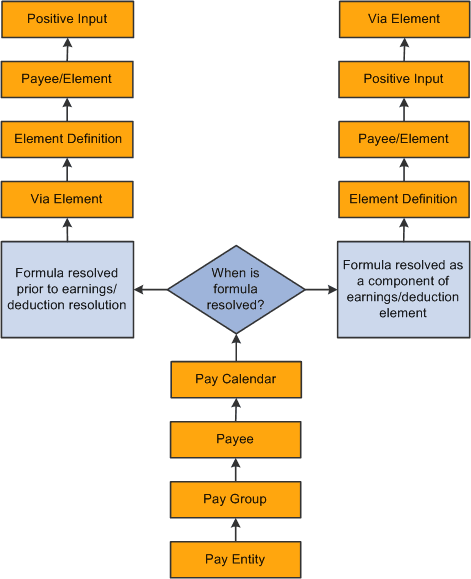
Note:
A payee/element override refers to the override of a variable element associated with a particular earning or deduction for a payee. Enter such overrides on the Element Detail page, linked to the Payee Assignment By Element and Element Assignment By Payee pages. A payee override is the override of a bracket, date, duration, formula, or variable associated with a payee. Enter such overrides on the Payee Supporting Element Overrides page.
Example
VARIABLE1 has the following values:
-
30 according to the rule definition.
-
20 according to a pay entity override.
-
10 according to a pay group override.
In this case, VARIABLE1 resolves to 10, because pay group overrides take precedence over pay entity overrides.