The Packaging and Upgrading Processes
To move rules and data between databases, you use several utilities in a specific sequence.
This illustration shows the typical sequence for using the utilities to move rules and data between databases.
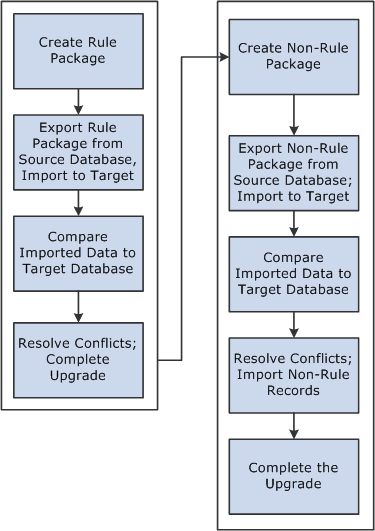
To move rules and data between databases:
-
Create and upgrade a rule package.
A rule package contains elements that are defined in records with PIN_NUM as the primary key. You use the Create/Export Rule Package and Apply Rule Package components to package and upgrade the elements you want to move. You can select individual elements for a package by name or by attribute, or you can select elements based on their version number. You tell the system whether you want to include only the focus elements or the focus elements plus the elements the focus elements use, based on the element map.
You can direct the system to delete or upgrade elements in the target database. A batch process creates a package of elements that you can view online.
After creating a package, you export it from the source database and import it into the target database; the system adds 50 000 000 to the value of each PIN number in the package to avoid overwriting elements in the target database that have matching PIN numbers.
A batch compare process follows, in which the system compares the packaged elements with those in the target database. The goal is to determine which elements are new to the target database, which match elements that exist in the database, and which need deleting according to your instructions. Elements that are new to the target database are assigned the next PIN number.
After reviewing the results of the comparison and resolving conflicts, you complete the upgrade process.
-
Create and upgrade a non-rule package.
Non-rule packages contain data from records where PIN_NUM is not the primary key—plus information about related elements.
To create a non-rule package:
-
Define the criteria for creating the package of data to move.
-
Export the non-rule data and element information from the source database.
-
Import information for the elements (not the elements themselves) into the target database.
-
Run a compare process that compares the packaged elements with those in the target database and identifies conflicts to address before importing non-rule data.
-
Import the non-rule data and start an upgrade process that renumbers the PINs in the non-rule data records that were moved to the target database.
For example, imagine that the absence results record (GP RSLT ABS) contains a take element with a PIN number of 1333 on the source database. The element was moved to the target database, and because it matches (based on PIN code) an element in the target database with PIN number 3453, the non-rule packager renumbers the PIN number in the absence results record.
-