Segmentation Considerations
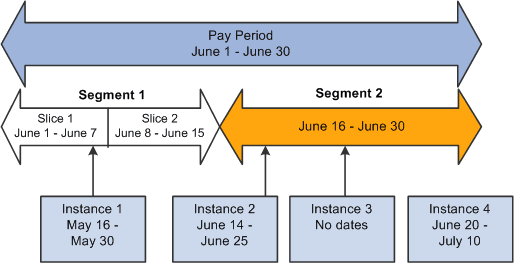
When a calendar pay period has period or element segmentation, positive input isn't prorated. It's assigned to a single segment or slice, based on the instance's end date:
-
If the end date falls before the calendar period begin date, the instance is assigned to the pay period's first segment or slice (see Instance 1 in the diagram).
-
If the end date falls in the pay period, the instance is assigned to the segment or slice in which the end date falls (see Instance 2).
-
When no end date is specified, the instance is assigned to the pay period's last segment or slice.
It's assumed that the end dates for the instance and the calendar are identical (see Instance 3). There is one exception: you can enter Do Not Process instructions to prevent the element's resolution. If you enter this instruction with no end date, the element isn't resolved in any slice or segment.
-
If the end date falls after the pay period end date, the instance isn't processed (see Instance 4).
This diagram illustrates instances assigned to segments and slices by end date
Example 1: Effect of Period Segmentation on Positive Input
You're processing your January payroll. On January 16, a payee is promoted, causing period segmentation (two gross-to-net payments). In an unrelated transaction, You enter positive input for the payee's earning element with a begin date of January 20 and an end date of January 21. Because the end date for the positive input falls in segment 2, it's processed in segment 2 only. In segment 1, the earning element is processed as usual, unaffected by the positive input:
| Segment 1 January 1−15 | Segment 2 January 16−31 |
|---|---|
|
Element is processed normally. |
Positive input is processed. |
Example 2: Effect of Element Segmentation on Positive Input
You're processing your January payroll. On January 16, a payee's compensation rate changes, causing element segmentation (slices). Positive input is entered for the payee with a begin date of January 20 and an end date of January 21. Because the end date for the positive input falls in slice 2, the positive input is assigned to that slice. The element isn't processed in slice 1. In other words, the positive input overrides the element slicing. (The slice dates are still relevant to accumulators.)
| Slice 1 January 1−15 | Slice 2 January 16−31 |
|---|---|
|
Positive input entered for element is not processed. |
Positive input is processed. |
Note:
This example illustrates an important point: if an element is sliced, and there is a positive input override targeted to one slice but not another in the same segment, the element is resolved only in the slice that receives the override, using the override values. There is no additional resolution of the element in other slices. This is because positive input overrides the normal resolution of the element for the entire segment (not just a single slice).
Example 3: Effect of Element Segmentation on Payroll Calculations
Rules for assigning positive input to slices and segments can affect payroll calculations.
Assume that (GROSS) = (PAY1) + (PAY2) . Without positive input or segmentation, the elements' value is:
| Element | Element Value Without Segmentation |
|---|---|
|
PAY1 |
3000 |
|
PAY2 |
900 |
|
GROSS |
3900 |
|
TAX |
10% × GROSS |
Tax = 390 [10% × 3900]
On June 10, the tax rate increases to 20 percent, triggering element segmentation. The segmentation event definition includes PAY1, PAY2, and TAX.
With element segmentation but no positive input, the value of each element is now as follows, assuming that PAY1 and PAY2 are prorated:
| Element Name | Slice 1 June 1−10 | Slice 2 June 11−30 |
|---|---|---|
|
PAY1 |
1000 |
2000 |
|
PAY2 |
300 |
600 |
|
GROSS |
1300 |
2600 |
|
TAX |
10% × GROSS |
20% × GROSS |
Tax = 650 [(10% × 1300) +(20% × 2600)]
Now suppose that you enter an instance of positive input, as follows:
| Element | Amount | Begin Date | End Date |
|---|---|---|---|
|
PAY1 |
3300 |
June 2 |
June 8 |
Because positive input is assigned to a slice based on its end date and the end date of our instance falls in slice 1, positive input for PAY1 is resolved in slice 1 and overrides the element's standard calculation. In addition, PAY1 isn't resolved in slice 2, since positive input for an element overrides the regular resolution in all slices within the same segment.
With positive input and element segmentation, the elements' value is:
| Element Name | Slice 1 June 1−10 | Slice 2 June 11−20 |
|---|---|---|
|
PAY1 |
3300 |
0 |
|
PAY2 |
300 |
600 |
|
GROSS |
3600 |
600 |
|
TAX |
10% × GROSS |
20% × GROSS |
Tax = 480 [(10% × 3600) + (20% × 600)]
If the instance of positive input has the following begin and end dates instead, the input is assigned to slice 2, making the 3300 subject to 20 percent tax:
| Element | Amount | Begin Date | End Date |
|---|---|---|---|
|
PAY1 |
3300 |
June 8 |
June 12 |
Then the elements' value is:
| Element Name | Slice 1 June 1−10 | Slice 2 June 11−20 |
|---|---|---|
|
PAY1 |
0 |
3300 |
|
PAY2 |
300 |
600 |
|
GROSS |
300 |
3900 |
|
TAX |
10% × GROSS |
20% × GROSS |
Tax = 810 [(10% × 300) + (20% × 3900)]
The tax amount is now 1080, not the 660 it would have been with the instance assigned to slice 1. The slice or segment to which positive input is assigned can significantly affect payroll calculations.
Note:
This example illustrates an important point: if an element is sliced, and there is a positive input override targeted to one slice but not another in the same segment, the element is resolved only in the slice that receives the override, using the override values. There is no additional resolution of the element in other slices. This is because positive input overrides the normal resolution of the element for the entire segment (not just a single slice).
Related Topics