What Happens When You Start a Pay Run
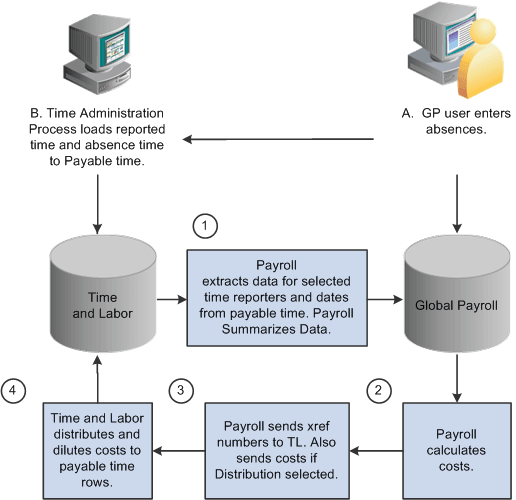
During the Calculate phase of a pay run, Global Payroll retrieves payable time that's ready for processing from Time and Labor. The first time that the Calculate phase runs, Global Payroll processes all payees that are identified in the current calendars. During subsequent runs, Global Payroll creates an iterative trigger and a retroactive trigger for each instance of payable time that has changed and reprocesses only the payees that are in error or have iterative triggers. Payable time is retrieved each time the payroll is run.
After a pay run is finalized, you start an update process that updates the payable time entries in Time and Labor. This process also invokes the Labor Distribution and Labor Dilution processes in Time and Labor, if you have elected to use those features. If you are not using labor distribution, Global Payroll sets the status of payable time entries to CL (closed).
The following flowchart illustrates the interactions between Global Payroll and Time and Labor.
Note:
Absence data that is sent to Time and Labor is not used to compensate payees for absences. Global Payroll calculates payee compensation for absences, and when the labor distribution feature is used, sends the resultant amounts back to Time and Labor after a pay run is finalized.