Direct Reports Pagelet
The Direct Reports pagelet displays information on direct reports.
This example illustrates the fields and controls on the Direct Reports pagelet. You can find definitions for the fields and controls later on this page.
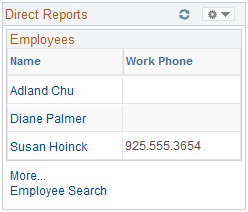
Managers use this pagelet to view a list of their direct reports.
| Field or Control | Description |
|---|---|
|
Name |
Click a link in the Name column to access the View Employee Personal Information page where you enter data and click Continueto access the Employee Information page in eProfile. On the Employee Information page in eProfile, you can view additional details for a specific employee. The Employee Information page also contains links to related employee data pages. |
|
More |
Click to access a wide version of the pagelet with multiple columns showing. additional data. The narrow version displays only the data specified in the Display Additional Information filed on the Personalize Direct Reports page. |
|
Employee Search |
Click to access the Employee Search page where you can define search criteria to find a specific employee. |
|
Skill |
Click to access the Current Team Profiles page for profiles to which you have security access, where you can view detailed information regarding the skills of a selected employee. Note: The Skilllink appears only on the wide version of the Direct Reports pagelet. |
|
Training |
Click to access the Training Summary page where you can view detailed information regarding training for a specific employee. Note: The Traininglink appears only on the wide version of the Direct Reports pagelet. |