Confirming the Correct Festive Advance Details
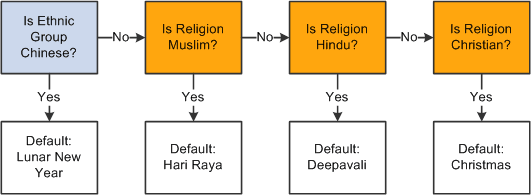
Usually, selecting the right festive advance is a simple process of selecting the festive holiday that fits the employee's religion and ethnic group. To do this, the system sets a default festive advance from the employee's religion and ethnic group. To set the default festive advance, the system looks at the following data:
-
If the employee’s ethnic group is Chinese, the default festive advance is Lunar New Year.
-
If the employee’s ethnic group is not Chinese, the system looks at the employee’s religion:
-
If the religion is Muslim, the default festive advance is Hari Raya.
-
If the religion is Hindu, the default festive advance is Deepavali.
-
If the religion is Christian, the default festive advance is Christmas.
-
This diagram shows the process flow for determining an employee's default festive holiday based on the employee's ethnic group and religion.
Although most employees are happy with the default festive advance chosen by the system from their religions or ethnic groups, the default is not necessarily the right choice. For example, nothing prevents a Christian from choosing the Chinese New Year holiday.
Some employees might choose to not have a festive advance at all. In this situation, you can select the N/A option on the Job Data - Employment Information page by navigating to
Employees with Multiple Jobs
The system enables one festive advance for each job, so if an employee has two jobs, the system enables that employee to have a festive advance for each job. This enables an employee with two part-time jobs to receive the same benefit as an employee with one full-time job.
Note:
You are not required to store effective-dated history of an employee's ethnicity, religion, or festive holiday. However, employees must receive only one festive advance in a calendar year. If any data that affects festive advances changes, the system notifies you that you should review the festive advance details. The festive advance is per employee and not per job, and as such, PeopleCode is activated to ensure that all the employee's concurrent jobs have the same festive advance data.