Running Mexican Training Reports
These topics discuss how to:
-
Run the DC-1 reports.
-
Run the DC-2 reports.
-
Run the DC-2B reports.
-
Run the DC-3 reports.
-
Run the DC-4 reports.
-
Run the DC-5 reports.
Pages Used to Run Mexican Training Reports
| Page Name | Definition Name | Usage |
|---|---|---|
|
STPS DC-1 Format MEX |
RUNCTL_STP001 |
Run the MXSTPP001 (format) and MXS TP—2 (reverse) reports. |
|
STPS DC-2 Format MEX |
RUNCTL_STP003 |
Run the MXSTP003 (format) and MXSTP004 (reverse) reports. |
|
STPS DC-2B Format MEX |
RUNCTL_STP005 |
Run the (MEX) DC-2B Training and Development Registration Application (MXSTP005) reports. |
|
STPS DC-3 Format MEX |
RUNCTL_STP006 |
Run the DC 3 Courses/Events Certificates (MXSTP006) reports. |
|
STPS DC-4 Format MEX |
RUNCTL_STP007 |
Run the MXSTP007 report. |
|
STPS DC-5 Format MEX |
RUNCTL_STP008 |
Run the Training and Development External Registration Application MXSTP008 (format) and MXSTP009 (reverse) reports. |
STPS DC-1 Format MEX Page
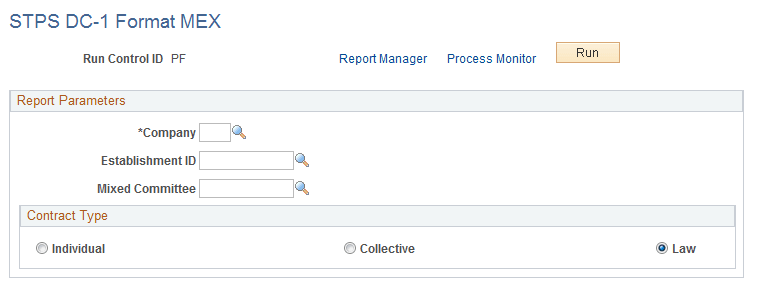
Use the STPS DC-1 Format MEX page (RUNCTL_STP001) to run the MXSTPP001 (format) and MXS TP—2 (reverse) reports.
Navigation:
This example illustrates the fields and controls on the STPS DC-1 Format MEX page. You can find definitions for the fields and controls later on this page.
STPS DC-2 Format MEX Page
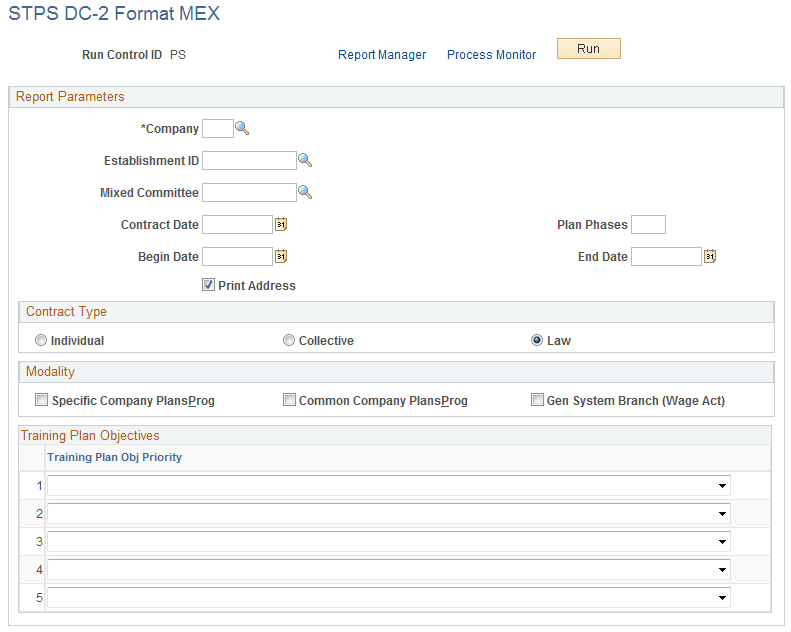
Use the STPS DC-2 Format MEX page (RUNCTL_STP003) to run the MXSTP003 (format) and MXSTP004 (reverse) reports.
Navigation:
This example illustrates the fields and controls on the STPS DC-2 Format MEX page. You can find definitions for the fields and controls later on this page.
| Field or Control | Description |
|---|---|
|
Contract Date |
Enter the collective contract signature date or the collective contract revision date. |
|
Plan Phases |
Define the number of phases in which you are going to run the training program plan. |
|
Training Plan Obj. Priority (training plan objective priority) |
Values are Increase Productivity, Prepare to Occupy New Vac/Pos, Prevent Work Risks, Provide New Technologies Info, and Upg/Improve Knowledge & Comp. |
STPS DC-2B Format MEX Page
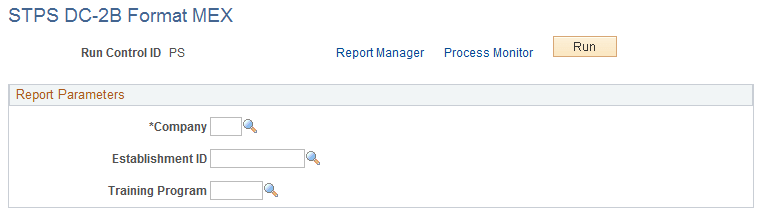
Use the STPS DC-2B Format MEX page (RUNCTL_STP005) to run the (MEX) DC-2B Training and Development Registration Application (MXSTP005) reports.
Navigation:
This example illustrates the fields and controls on the STPS DC-2B Format MEX page. You can find definitions for the fields and controls later on this page.
| Field or Control | Description |
|---|---|
|
Training Program |
Select the type of training program. |
STPS DC-3 Format MEX Page
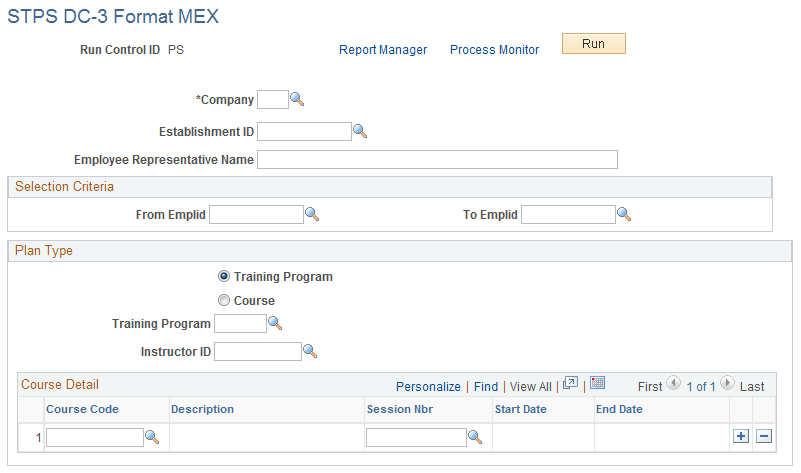
Use the STPS DC-3 Format MEX page (RUNCTL_STP006) to run the DC 3 Courses/Events Certificates (MXSTP006) reports.
Navigation:
This example illustrates the fields and controls on the STPS DC-3 Format MEX page. You can find definitions for the fields and controls later on this page.
| Field or Control | Description |
|---|---|
|
Employee Representative Name |
Enter the name of the employee representative who is on the Mixed Committee. |
| Field or Control | Description |
|---|---|
|
From Emplid and To Emplid |
Enter the range of employee numbers for whom this training is being provided. |
| Field or Control | Description |
|---|---|
|
Plan Type |
Select the training plan type. You can select either Training Program or Course. If you select Training Program, you also need to enter the Instructor ID. |
| Field or Control | Description |
|---|---|
|
Course Code |
Select the course code. The course description displays next to the course code. |
| Field or Control | Description |
|---|---|
|
Session Nbr |
Select the session number for the course being taught. |
| Field or Control | Description |
|---|---|
|
Start Date and End Date |
Once you have entered the course code and session number, the system displays the start and end date for the next available course. |
STPS DC-4 Format MEX Page
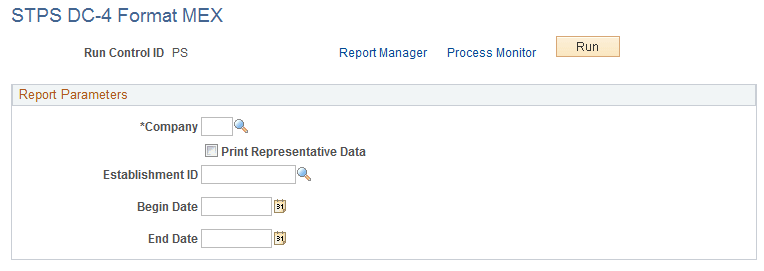
Use the STPS DC-4 Format MEX page (RUNCTL_STP007) to run the MXSTP007 report.
Navigation:
This example illustrates the fields and controls on the STPS DC-4 Format MEX page. You can find definitions for the fields and controls later on this page.
STPS DC-5 Format MEX Page
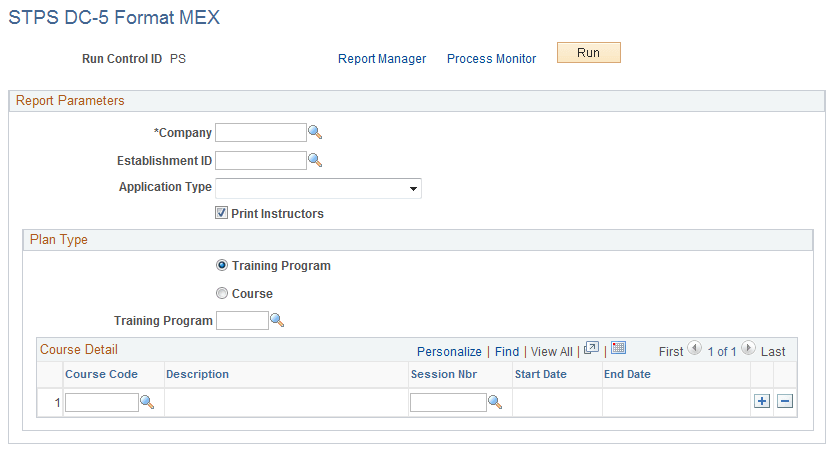
Use the STPS DC-5 Format MEX page (RUNCTL_STP008) to run the Training and Development External Registration Application MXSTP008 (format) and MXSTP009 (reverse) reports.
Navigation:
This example illustrates the fields and controls on the STPS DC-5 Format MEX page. You can find definitions for the fields and controls later on this page.
| Field or Control | Description |
|---|---|
|
Application Type |
Values are Initial, Instructor Change, New Programs, and Update Courses. |
|
Print Instructors |
Select to include instructor names on the report. |