Tracking and Processing Training Data Using Administer Training and Global Payroll
To track and process training data:
-
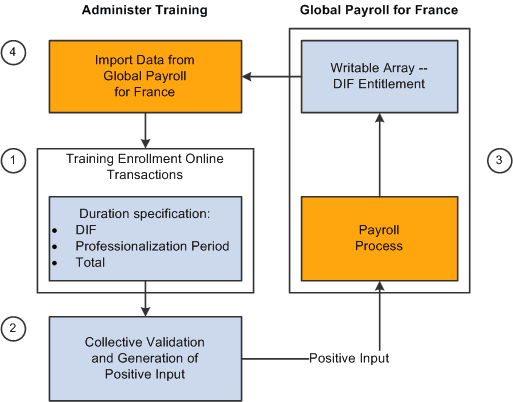
Use the Demand from Budget Training and Training Hours Details pages to:
-
Indicate when enrollment in a course occurs as part of a professionalization contract.
-
Indicate when enrollment in a course occurs for the purpose of skills development.
-
Record DIF and non-DIF hours.
-
-
Validate DIF and skills development training hours and transfer these hours to the payroll system using the FRA Training Validation (GP) and FRA Training Admin Validation components.
-
Process payroll and calculate DIF and skills development entitlements (earnings) in Global Payroll for France based on the training hours validated in step 2.
-
Import DIF balance data from Global Payroll for France into Administer Training using the writable array FOR WA DIF HR.
Training administrators and others can then view this data on the enrollment pages in Administer Training to determine whether there are enough hours in a student's DIF balance to permit additional DIF allocations.
These four steps can be represented as shown in this diagram: