(USF) Tracking Federal Training Requests
When you request training, you assign a status to the request, and the system routes it to authorizing and approving officials according to the agency's requirements. After reviews and approvals, the system enrolls or wait-lists the students.
The following pages are used for training tasks:
-
To request training, use the Student Enrollment - Enroll Individually page.
-
To directly enroll or wait-list students in training course sessions, and to enter students' grades for completed sessions, use the Create/Update Course Wait List page or the Student Enrollment - Enroll Individually page.
-
To review and print an employee's training request information, use the Student Enrollment - Enroll Individually page or the Review Training Summary page.
Page Used to Track Training Requests
| Page Name | Definition Name | Navigation | Usage |
|---|---|---|---|
|
Enroll Individually |
COURSE_ENROLLMENT |
|
Track and review the courses that an individual student has requested and print the Training Request Form (SF182). |
Enroll Individually Page
Use the Enroll Individually page (COURSE_ENROLLMENT) to track and review the courses that an individual student has requested and print the Training Request Form (SF182).
Navigation:
This example illustrates the fields and controls on the Enroll Individually page showing the federal fields. You can find definitions for the fields and controls later on this page.
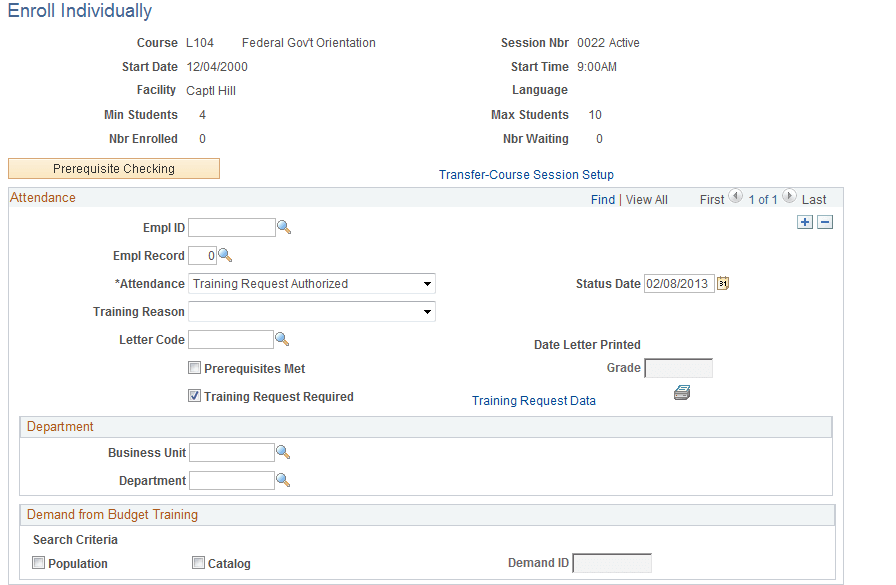
| Field or Control | Description |
|---|---|
|
Course, Session Nbr, and Attendance |
To add a course, insert a row and select the course, session number, and attendance status. |
|
Training Request Required |
Select the Training Request Required check box to make the Training Request Data link available. |
|
Training Request Data |
Click the link to view the Employee Training Request Data (USF) page and enter or view training request information. Click to print the Training Request Form (SF-182). The form is printed after you have completed and saved training request information. |
|
Print SF182 (icon) |
Click to print the Print SF-182 icon to have the form printed after you have completed and saved training request information. |