Adding and Updating Data
For U.S. Federal Government customers, to add, update, or change any employee data, you create a PAR. To submit and route and track a PAR automatically through the approval process, assign a PAR work-in-progress status code that indicates its position in the request cycle and determines where to send it.
Automatically Routing the PAR
By changing the request status and saving the page, reviewers acknowledge receipt and approval, and send a PAR forward through workflow. Each review level serves as verification that the information is complete and that the necessary documents are attached. The reviewers may also enter their own comments. Your agency can set up and route request cycles for each type of request from creation through various reviews, including as many or few reviews as desired, and on to final Human Resources completion.
Selecting a PAR Status
If you want to open a request, fill in partial data and then complete it later, open a request and assign a PAR status of Initiated. While you gather additional information, the request stays within your own domain and control. You can revisit it as often as needed until you are ready to submit it for review.
When your request data is complete and you want to proceed with the automatic routing review cycle, submit the request by assigning a PAR status of Requested. By doing so, you make the request official. Once the originator submits a Requested action, workflow retrieves it and automatically routes it to others who are involved in the processing, and the authorizing and approving officials review its merits. It may go through a review cycle that includes 1st Authorized and 2nd Authorized by specific supervisors and managers, Approved/Signed by second-level managers, and finally to the status of Processed (processed by HR), according to your agency's requirements.
If clarification or additional information is needed, a reviewer can choose the status of Returned for More Information. Returning it to the originator restarts the process. A reviewer can also disapprove a request by assigning the Disapproved status, which stops the process altogether. During the review cycle, the originator can also withdraw a request while it is still in a work-in-progress state.
Only the originator can cancel or change and resubmit a request that is in progress. Because other supervisors, managers, and human resources officials don't have the ability to change request data, if a request needs to be Cancelled, you must return it to the originator.
When a user chooses a work-in-progress status and assigns a PAR status code, this code indicates the request's status and position and enables workflow to route and monitor it through the approval cycle.
We provide a general example of the review cycle, though your agency can set it up differently if necessary.
An Overview of PAR
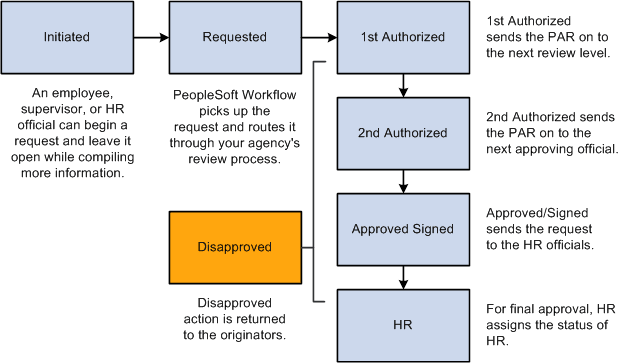
This illustration shows an overview of a sample process. In this example, an employee, supervisor, or HR official initiates the PAR and submits it for approval. The PAR then goes through multiple levels of authorization before it is either approved or denied:
Disapproving or Returning a Request
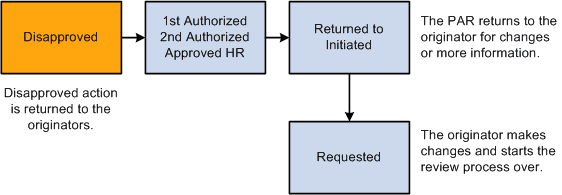
This illustration provides an example of a business process when a request is disapproved. In this example, the request is put back in the Initiated state so that the originator can modify it as necessary and resubmit it. The resubmitted request then goes through the standard approval cycle again:
Note:
Although a status of Returned/Disapproved is delivered, workflow isn't part of this feature.
Cancellation, Correction, or Withdrawal of a Request
Requests can be cancelled, withdrawn, or corrected only in specific situations:
-
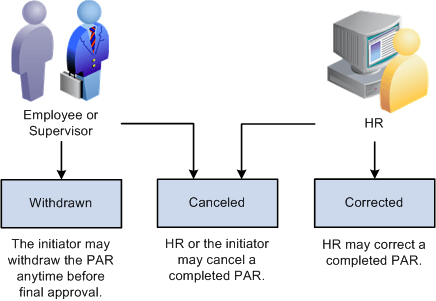
Any time before final approval, the initiator can withdraw the request.
-
Once the request is approved, either the initiator or HR can cancel the requests, but only HR can correct the completed request.
The following diagram shows who can cancel, correct, or withdraw a request:
Identifying PAR Status Codes
Following are definitions for each work-in-progress status and PAR status code that are set up in the sample data delivered with your system:
| Work-In- Progress Status | PAR Status Code | Definition |
|---|---|---|
|
Initiated |
INI |
Indicates an action is open, but not yet submitted as a request. For various reasons, originators may begin a request and then find they need additional time or data before completing their work on that action. By assigning a status of Initiated, originators can leave the request open until it is ready to submit. Supervisors may need extra time to develop supporting documentation, such as job codes, and can assign a status of Initiated to designate that their work is in progress. |
|
Requested |
REQ |
To submit a request, assign a status of Requested. Most requests then go automatically to the first-level supervisor for approval. An exception is the request for family/benefits change; you may want to set the system up to send this type directly to a human resources (HR) official to be processed. Or when a request originates in the HR department, it may go directly to an HR official to be processed. |
|
1st Authorized |
1st |
The first-level reviewer assigns a status of 1st Authorized to send a request forward to the next review level. |
|
2nd Authorized |
2nd |
A first-level reviewer sends a request forward to the next review level by assigning a status of 2nd Authorized. |
|
Approved/Signed |
SIG |
A second-level reviewer sends a request forward to an HR official to be processed by assigning a status of Approved/Signed. |
|
Processed By Human Resources |
PRO |
Only human resources officials can assign the status of Processed By Human Resources. They first review and complete the request and may add the appropriate nature-of-action code, legal authorities, and remarks. They indicate final approval by assigning the status of PRO. The request then becomes an actual event. A status of PRO is final and can't be changed by anyone. Once a request becomes an actual event, it is then available for further consideration and processing by payroll, benefits, interface reports, and other areas. |
|
Return for More Information |
RET |
Anywhere in the process, a reviewer can request more information or clarification by assigning a status of Returned for More Information and can include a comment such as, "I need further information." The request goes back to the originator. When originators get the returned request, they add the information, reassign a status of Requested, and the process begins again. |
|
Withdrawn |
WTH |
The original creators of the request may withdraw a request if it is sent back to them for any reason. Human resources may withdraw a request when it is proven invalid or for some reason no longer is needed. Note: A request cannot be withdrawn after it has been either processed or disapproved. |
|
Disapproved |
DIS |
At any point in the process, a reviewer can disapprove a request by assigning a status of Disapproved and entering the reason in the Comments field. This causes the request to be sent back to the originator either for cancellation or for the originator to change and resubmit it. |
|
Corrected |
COR |
Only a human resources official has the authority to perform a correction after a request has completed the approval cycle and been finalized. |
|
Cancelled |
CAN |
A human resources official has the authority to perform a cancellation after a request has completed the approval cycle and been finalized. The Cancelled status removes the request from the active request system, leaving only the tracking record history. Or if the originator receives a returned request, the originator may assign a status of Cancelled. |
Related Topics