Processing Automatic Actions
Your agency's human resources personnel have many tasks to oversee: recruiting new employees, making hiring decisions, administering reviews, and tracking changes in employees' personal data, among others. Unfortunately, much of their time can be spent processing routine, tedious data. PeopleSoft HCM USF functionality automates some of these routine tasks, leaving your professionals free to spend time on other projects that require their professional insight and skills.
The PeopleSoft Human Resources Administer Workforce business process offers an Automatic Actions process to administer these routine tasks:
-
Probation termination.
-
Tenure conversion.
-
WGIs.
If you activate workflow, PeopleSoft Human Resources alerts you of upcoming waiting period terminations or step increases and then automatically updates employee records without user intervention. After you assign supervisors to review automatic action notices, you won't forget these important dates.
The procedure is identical for all three automatic actions:
-
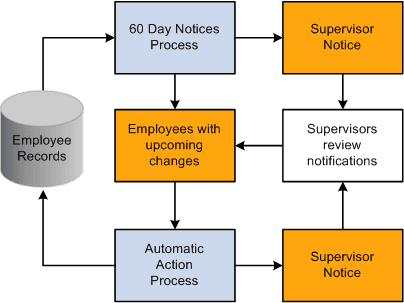
Run a process to identify employees with upcoming probation terminations, tenure conversions, or within-grade increases in the next 60 days.
The system creates online notifications of upcoming changes and sends them to the worklist of designated supervisors.
-
Review online notifications and make any necessary changes to employee records.
Unless you change status or date fields in the employee's records to stop the update from occurring, the respective process updates the employee's records.
-
Run a process on the specified date to change employee records.
This process also creates notices and sends them to supervisor worklists.
The following diagram illustrates automatic action processing, including the creation of advance supervisor notification, the automated updates to employee data, and the supervisor notifications that the updates have been completed: