Understanding Multiple Jobs
Many organizations have employees who work in more than one job at the same time. Calculating benefit deductions and determining benefit eligibility requires special considerations. When an employee is hired into another position, use the Add New Assignment page in PeopleSoft HRAdminister Workforce. Each job is assigned an employee record number and a benefit record number.
A benefit record number is used to group several jobs together for benefit purposes. Each employee record number is unique. However, a benefit record number can be assigned to multiple employee record numbers.
-
If the new job entitles the employee to a new set of concurrent benefits, use a new benefit record number.
-
If the job does not entitle the employee to new benefits, use an existing benefit record number.
Each benefit record number must have a designated primary job. The primary job is used to process benefit information.
-
Service and termination dates are pulled from the primary job and used by the deduction processes.
-
During deduction processing, the primary job determines when to take a deduction from an employee's check.
WARNING:
Do not confuse the benefits-related primary job with the primary/secondary job indicator found on the Job Data pages. These are separate fields with very different functionality.
For PeopleSoft Benefits Administration, the primary job is used to:
-
Supply company and BAS (Benefits Administration) group data to the processing schedule. If a schedule specifies a particular BAS group ID, then the BAS group ID of the primary job within a benefit record number determines whether that employee's benefit record number is processed by the schedule.
-
Determine how credits (additional pay) for benefits are paid.
You need to determine how to group jobs for calculating benefit deductions or determining benefit eligibility. For example, suppose a professor has three jobs:
-
A dean at a college.
-
A faculty member at the college.
-
A physician at a hospital associated with the college.
When the professor's job data is entered in Administer Workforce, the system updates the Primary Jobs Table with information regarding the relationships between jobs and their benefit groups. For example, the following attributes might result:
| Job Description | Employee Record Number | Benefit Record | Primary Job Indicator | Include for Eligibility | Include for Deductions |
|---|---|---|---|---|---|
|
Professor |
0 |
0 |
Yes |
Yes |
Yes |
|
Dean |
1 |
0 |
No |
Yes |
Yes |
|
Physician |
2 |
1 |
Yes |
Yes |
Yes |
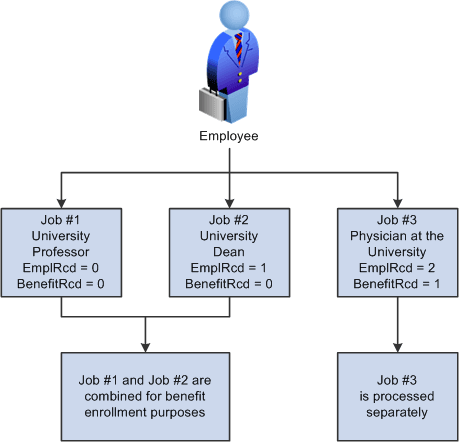
The following diagram shows the employee's three jobs and two benefit records. The first two jobs as a university professor and university dean share the same benefit record number for benefit enrollment purposes. However, the third job as a physician at the university has its own unique benefit record number and therefore the job is processed separately from the other jobs. Each benefit record corresponds to a set of benefits enrollments:
You can set default rules on the Multiple Jobs Options page to determine the setting and management of these options automatically for hires, rehires, and terminations.