Understanding Retroactive Distribution of Funding Sources
You can make mass changes to the distribution of funding sources at the department, job code, position pool, position, or job data (appointment) level for data that has been posted to PeopleSoft General Ledger.
Create retroactive transactions directly by using the Direct Retro Distributions (direct retroactive distributions) process to search the database for records that meet search criteria and replace selected data in those records with new information. Or create retroactive transactions by modifying department budgets. When you start the Budget Retro Distribution process, the system will create retroactive transactions for all records affected by the changes, either using the Direct Retro Distribution process or in the Department Budget Table component (DEPT_BUDGET).
After you create the transactions, using either method, view them in the Review Retro Distribution (review retroactive distribution) component (HP_RDIST_TRANS_USA or HP_RDIST_TRANS_CAN) to ensure that they are correct and make changes if necessary. From there, start the online transaction process to apply the new transactions to the actuals data.
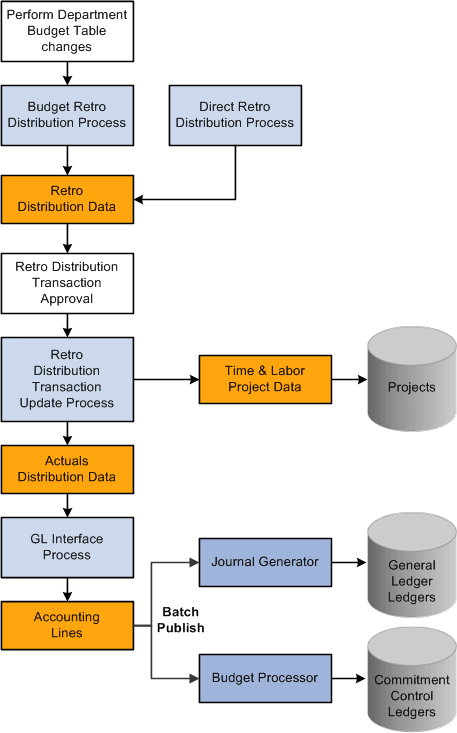
The following diagram illustrates the two methods of creating retroactive transactions, applying transactions, and the flow of data through the Commitment Accounting business process and to other PeopleSoft applications:
This diagram illustrates the two methods of creating retroactive transactions, applying transactions, and the flow of data through the Commitment Accounting business process and to other PeopleSoft applications