Managing Compensation Data
This section provides an overview of compensation management and discusses how to update compensation for employees.
Pages Used to Update Compensation Data
| Page Name | Definition Name | Usage |
|---|---|---|
|
Compensation - 1 Page |
FPAEESALARY_PNL1 |
Enter an action that adds or modifies employee compensation data. |
|
Compensation - 2 Page |
FPAEESALARY_PNL2 |
Update compensation for employees. |
Understanding Compensation Management
The compensation pages affect only employees without career data. The pages distinguish between employees in salary grade tables and employees with free compensation.
The base compensation of employees without career data and in salary grade tables are defined automatically by their job codes and steps. You manage this data in the Update Assignment FPS component by forcing indexes or amounts.
For employees without career data and with free compensation, you enter the compensation amounts directly.
In Manage French Public Sector, employee compensation is managed on different pages, depending on status and compensation mode:
| Status | Pages | Managed Data |
|---|---|---|
|
Employee With Career |
Career - Compensation Seniority |
Compensation + Forced Index |
|
Employee Without Career - in Salary Grade table |
Assignment - Job Information, Compensation - 2 |
Base Compensation, Forced Salary |
|
Employee Without Career - outside Salary Grade table |
Compensation - 2 |
Compensation |
|
All statuses |
Employee Premiums |
Financial bonuses |
Compensation - 2 Page
Use the Compensation - 2 page (FPAEESALARY_PNL2) to update compensation for employees.
Navigation:
This example illustrates the fields and controls on the Compensation - 2 page. You can find definitions for the fields and controls later on this page.
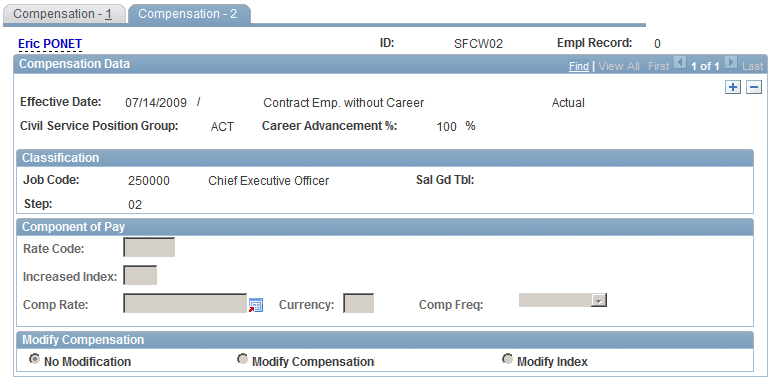
Updating Compensation for Employees in Salary Grade Tables
To update compensation for employees in salary grade tables:
-
Select Modify Index or Modify Compensation.
These options are available only if Forced Salary is selected (for the specified period) on the Assignment - Job Information page.
-
Adjust the Component of Pay data.
Updating Compensation for Employees with Free Compensation
Only the Component of Pay group box appears for employees with free compensation.
To update compensation for employees with free compensation:
-
Select the Rate Code.
The system populates Frequency, Currency, and Comp Rate.
-
Modify the values of these fields as needed.