Transferring Information from an Employee to Person of Interest Relationship
PeopleSoft HR provides benefit plan data, personal data, job data, and tracks human resources events and statuses. This data is used for pension payees, which include both employees (retirees) and non-employees (beneficiaries). Changing an employee to a retiree requires updating his employment relationship to a person of interest (POI) and updating Job Data to reflect the retiree job information.
Changing an Employee Relationship
Very few changes are required to establish a retiree’s personal data record; only the person type needs to be changed. To track information for the retiree, use the person’s employee ID.
Access the component to transfer an employee to a person of interest.
This example illustrates the fields and controls on the Other Payee page.
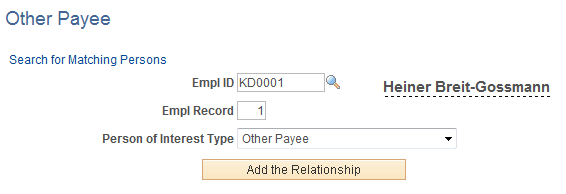
Enter information on this page to create a POI Job associated to a new employee record. Select Other Payee as the Person of Interest Type value. The POI type is used for retirees that are not paid via Pension Administration. You can then see two jobs for this employee as you essentially have given a payee a job as a retiree.
Entering Work Location Information for a Retiree
Access the Work Location page to enter work location information for retirees.
See PeopleSoft Human Resources Administer Workforce: Work Location Page
Enter the values for the Company, Business Unit, Department, and Location fields as structured for your retiree plan. Payee records in the HCM system use the same data structure as employee records. This means that you identify companies, jobs, locations, and other employment-related information in the payee records. Much of this data is generic to all payees. For example, you can establish a single job to use for all retirees.