Manage Profiles Setup
This diagram illustrates the optional and required steps for setting up profile management:
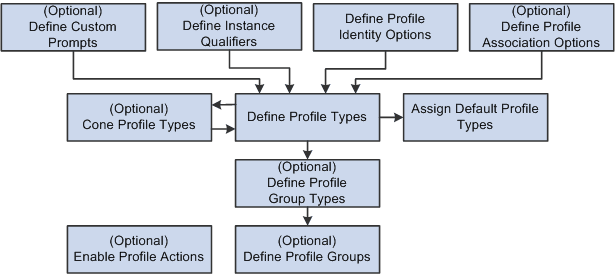
To set up profile management you define the following:
-
(Optional) Custom Prompts.
-
Custom prompts are used to define the prompt list for the JPM_PROMPT properties which allows you to customize the list of values that is permitted to be entered.
-
(Optional) Instance qualifiers.
Instance qualifiers are used as additional key fields for a profile item. They can prompt off of a table or the valid values can be defined within the instance qualifier. Instance qualifiers are used to identify who updated the profile or the type of evaluation. You can also use instance qualifiers to restrict the profile item rows that are visible to employees and managers using self-service transactions.
-
Profile Identity Options.
-
(Optional) Profile Association Options.
Note:
You do not need to define profile association options for the Manage Profiles business process. However, if you have installed ePerformance and you want to use profile content to create performance or development documents, you must define profile association options for ePerformance.
-
Profile Types and Clone Profile Types.
To facilitate profile type creation, the system enables you to copy an existing profile type through the Clone Profile Types Application Engine process. You can then modify the new profile type using the Profile Types component.
Note:
Profile Type configurations are delivered for CLUSTER, ROLE, JOB, and PERSON. It is strongly recommended that if changes need to be made to these types, this should be done by adding a new effective dated entry for the profile type. Caution should be used when changing ROLE and PERSON content sections since there may be existing integration requirements. Refer to the topic Manage Profiles Integrations to determine the business processes that leverage profile content. Caution must be taken in the removal of delivered properties since there may be processing tied to the property.
New properties should not be specified with an attribute of Required if profile data already exists. It is recommended that the Maximum Length value not be changed to avoid possible truncation during integration with other products.
-
Assign Default Profile Types.
The system uses the primary person and non-person profile types for products that need to interact with Profile Management.
-
(Optional) Profile Group Types and Profile Groups.
Profile group types and profile groups enable you to categorize profile types. Profile group types are defined as either person or non-person. Profile groups are used as search criteria in the search and compare profiles feature to filter the search results.
-
(Optional) Profile Actions (for Classic only)
Profile actions enable administrators, managers, and employees to perform transactions directly from the non-person profile and person profile pages.
Note:
Before you can use Manage Profiles, you must also set up the installation settings on the Profile Management Installation page. This is described in the next section.