Example of Group Funding Allocations
The preceding section outlined the generic procedures for allocating funds and calculating awards for groups and their managers down the tree. This section provides a sample group tree and outlines the procedures for distributing funding and allocating awards for groups in the tree.
Sample Group Tree
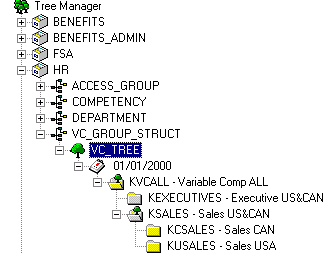
This example illustrates a tree named VC_Tree and includes various groups and subgroups.
This is a VC Tree example showing the relationships of various groups and subgroups.
Deleting Duplicate Membership
Because of the way hierarchical groups are set up, most workers are members of multiple groups. For example, a member of the Sales Canada group, KCSALES, is also a member of the Sales group, KSALES, and therefore, is a member of the overall group, KVCALL. During the Determine Eligibility/Proration process, the Delete Duplicates step removes workers from all intermediate levels and leaves them only as members of the lowest level group to which they belong. It is in this lowest level group that their awards are determined.
This table displays all group members in the sample tree hierarchy according to the initial group definition in group build. At each level, the members listed in italics remain as members of the group; members not in italics are deleted as duplicates. The table also names the approver and manager of each group.
This table displays all group members in the sample tree hierarchy according to the initial group definition in group build. At each level, the members listed in italics remain as members of the group; members not in italics are deleted as duplicates. The table also names the approver and manager of each group.
| Top Group Level 0 | Group Members and Subgroups on Level 1 | Group Members and Subgroups on Level 2 | Group Members |
|---|---|---|---|
|
KVCALL Approver KU0002 Manager KU0003 |
. |
. |
. |
|
|
KU0003 |
|
|
|
|
KU0007 |
|
|
|
|
KC0002 |
|
|
|
|
KC0005 |
|
|
|
|
KC0013 |
|
|
|
|
KC0008 |
|
|
|
|
KC0022 |
|
|
|
|
KC0027 |
|
|
|
|
KU0051 |
|
|
|
|
KU0064 |
|
|
|
|
KU0082 |
|
|
|
|
KEXECUTIVES Approver KU0003 Manager KC0002 |
|
|
|
|
|
KC0002 |
|
|
|
|
KC0005 |
|
|
|
KSALES Approver KU0003 Manager KC0013 |
|
|
|
|
|
KC0013 |
|
|
|
|
KU0082 |
|
|
|
|
KC0008 |
|
|
|
|
KC0022 |
|
|
|
|
KC0027 |
|
|
|
|
KU0051 |
|
|
|
|
KU0064 |
|
|
|
|
KCSALES Approver KC0013 Manager KC0008 |
|
|
|
|
|
KC0008 |
|
|
|
|
KC0022 |
|
|
|
|
KC0027 |
|
|
|
KUSALES Approver KC0013 Manager KC0008 (not a group member) |
|
|
|
|
|
KU0051 |
|
|
|
|
KU0064 |
Identifying Managers and Approvers
Because the approvers in this example are the higher-level managers, they are not members of the groups they approve.
Managers generally are members of the groups they manage. In this example, the group KUSALES is an exception because it is managed by KC0008, who manages KCSALES. KC0008 is a member of KCSALES but not of KUSALES.
In this example, the user ID is identical to the employee ID.
Steps for Allocating Funds
The VC administrator first allocates funds to the overall plan using the Plan Funding page. After that, the process proceeds like this:
-
Fund and award KVCALL group members:
-
User KU0002 runs the Determine Allocations process using the Determine Allocation page.
-
User KU0002 (approver of KVCALL) allocates funds to the top group KVCALL on the Group Funding Allocation - Fund Plan page.
-
User KU0002 runs the Calculate Awards process for KVCALL using the Calculate by Group page.
-
User KU0002 modifies and approves the award for KU0003, manager of KVCALL, using the Allocate Awards by Group page.
Approval for the manager must always be manual in the Allocate Awards by Group page.
-
User KU0003 (manager of KVCALL) modifies the awards for his direct reports (KU0007) and sets them to Recommended status using the Allocate Awards by Group page.
-
User KU0002 (approver for KVCALL) approves the award for KU0007.
The approver manually approves the award using the Allocate Awards by Group page or automates the approval using the Approve Awards by Group process.
When the awards for KVCALL are approved, the system submits them for payout or distribution.
-
-
Fund and award KEXECUTIVES and KSALES group members:
(KSALES steps f and g can be done in parallel to KEXECUTIVES steps d and e)
-
User KU0003 (manager of KVCALL) allocates funds to KEXECUTIVES and KSALES using the Allocate Group Funding page.
-
User KU0003 runs the Calculate Awards process for KEXECUTIVES and KSALES using the Calculate by Group page.
-
User KU0003 modifies and approves the awards for KC0002 (manager of KEXECUTIVES) and KC0013 (manager of KSALES) using the Allocate Awards by Group page.
-
User KC0002 (manager of KEXECUTIVES) modifies the awards for his direct reports (KU0005) and sets them to Recommended status using the Allocate Awards by Group page.
-
User KU0003 (approver for KEXECUTIVES) approves the awards for KU0005.
The approver manually approves the awards using the Allocate Awards by Group page or automates the approval using the Approve Awards by Group process.
When the awards for KEXECUTIVES are approved, the system submits them for payout or distribution.
-
User KC0013 (manager of KSALES) modifies the awards for his direct reports (KU0082) and sets them to Recommended status using the Allocate Awards by Group page.
-
User KU0003 (approver for KSALES) approves the award for KU0082.
The approver manually approves the award using the Allocate Awards by Group page or automates the approval using the Approve Awards by Group process.
When the awards for KSALES are approved, the system submits them for payout or distribution.
-
-
Fund and award KCSALES and KUSALES group members:
(KUSALES steps f and g can be done in parallel to KCSALES steps d and e)
-
User KC0013 (manager of KSALES and approver for both KCSALES and KUSALES) allocates funds to KCSALES and KUSALES using the Allocate Group Funding page.
-
User KC0013 runs the Calculate Awards process for KCSALES and KUSALES using the Calculate by Group page.
-
User KC0013 modifies and approves the awards for KC0008 (manager of both KCSALES and KUSALES) using the Allocate Awards by Group page.
-
User KC0008 (manager of KCSALES) modifies the awards for her direct reports (KC0022 and KC0027) and sets them to Recommended status using the Allocate Awards by Group page.
-
User KC0013 (approver for KCSALES) approves the awards for KC0022 and KC0027.
The approver manually approves the awards using the Allocate Awards by Group page or automates the approval using the Approve Awards by Group process.
When the awards for KCSALES are approved, the system submits them for payout or distribution.
-
User KC0008 (manager of KUSALES) modifies the awards for her direct reports (KU0051 and KU0064) and sets them to Recommended status using the Allocate Awards by Group page.
-
User KC0013 (approver for KUSALES) approves the awards for KU0051 and KU0064.
The approver manually approves the awards using the Allocate Awards by Group page or automates the approval using the Approve Awards by Group process.
When the awards for KUSALES are approved, the system submits them for payout or distribution.
-
Related Topics