Paysheets
Before you run payroll calculations, you must create paysheets. Paysheets contain the data required to calculate employee pay for each pay period.
To create a paysheet automatically, use the Create Paysheet COBOL SQL process (PSPPYBLD). This process gathers information about the employees for whom to process payroll from system tables and generates the pay earnings information for each payline.
To create a paysheet manually, create a blank paysheet with only the pay begin and end dates specified.
Use the paysheets in the Payroll Processing menu to enter time and any additional payroll-related information for the current pay period (such as earnings, frequency, one-time deductions, one-time garnishments, one-time taxes, accounting data, and tax periods) before you run the Pay Calculation process.
Use the rapid entry paysheet functionality to quickly input basic payroll data entry information based on hours worked, amounts, or a combination of both.
After you create paysheets, you can print them for review.
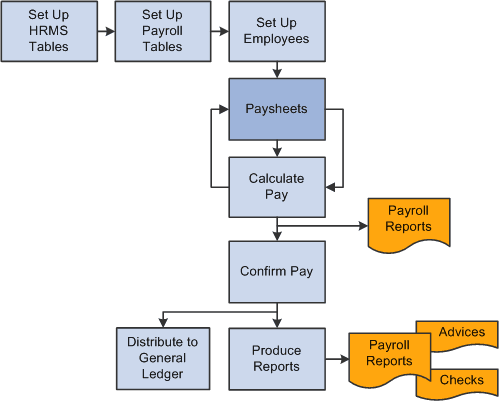
This diagram illustrates how paysheets fit into the payroll process, from setting up PeopleSoft HR tables to producing payroll reports and sending data to general ledger:
This diagram illustrates how paysheets fit into the payroll process, from setting up PeopleSoft HR tables to producing payroll reports and sending data to general ledger.
See Payroll Processes.