Export Process Flow
This diagram illustrates the Export process flow:
This diagram illustrates the Export process flow.
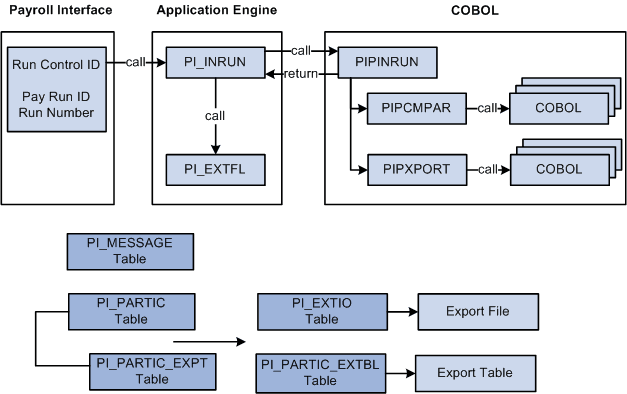
Export processing occurs in the following way:
-
To start the Export process, use the Import/Export Payroll Data (PI_RUNCTL_PNL) component, Import/Export Payroll Data run control page to enter the pay run ID, payroll interface run number, and other parameters.
-
PI_INRUN reads the pay run ID and run number and calls PIPINRUN.
-
PIPINRUN calls PIPCMPAR (which in turn calls other subroutines). PIPCMPAR selects, compares, and exports data to tables PI_PARTIC and PI_PARTIC EXPT.
-
PIPINRUN calls PIXPORT (which in turn calls other subroutines). PIPXPORT reads table PI_PARTIC_EXPT, transfers the changed data to temporary table PI_EXTIO or PI_PARTIC_EXTBL.
-
PIPINRUN returns control to PI_INRUN.
-
PI_INRUN calls PI_EXTFL.
-
If exporting to a file, PI_EXTFL reads the data in PI_EXTIO and creates the export file. If exporting to a table, PI_EXTFL reads the data in PI_PARTIC_EXTBL and creates the export table.