Setting Up a DETI Import Interface Definition
Use the Detail Interface (DETI) sample data definition to set up an import interface definition that loads the employee check detail information produced by the third-party payroll system.
To set up the import interface, obtain a copy of the data file from the third-party payroll vendor that matches the DETI sample data definition. Then, examine the Payroll Interface fields and records that are associated with it:
-
Ensure that the key values that you map using the PI_CHECK table are the same values that are mapped on the three DETAIL child records, plus one more to make it a unique child.
You must also create a field definition for each data field that is present in the file, including a filler for unwanted data when the data is defined by its position in the record.
-
Define the import records.
-
Attach your file definition to the Payroll Interface configuration ID and define the external file handle to enable the COBOL program to find the input file.
For physical file types, some data fields may be defined according to type (such as OASDI tax type) by their position in the import record. As shown in this example, Payroll Interface reflects this tax type by creating a separate row for each occurrence and captures the tax type during import by attaching a group ID:
This example of the Interface Group Table page shows a sample Group ID used for import.
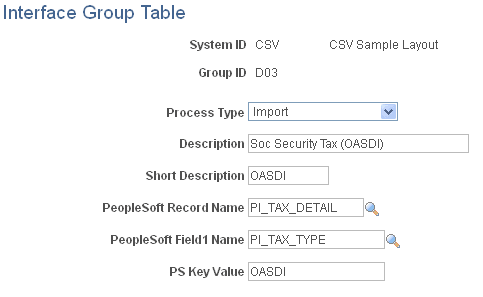
As shown in this example of the Interface Group Table page Payroll Interface uses the entry in the PS Key Value (PeopleSoft key value) field to populate the field defined in PeopleSoft Field1 Name with OASDI, as it is builds the data for the record given by PeopleSoft Record Name from the import row being processed:
This example of the Interface Definition Fields page shows a sample interface definition used for import.
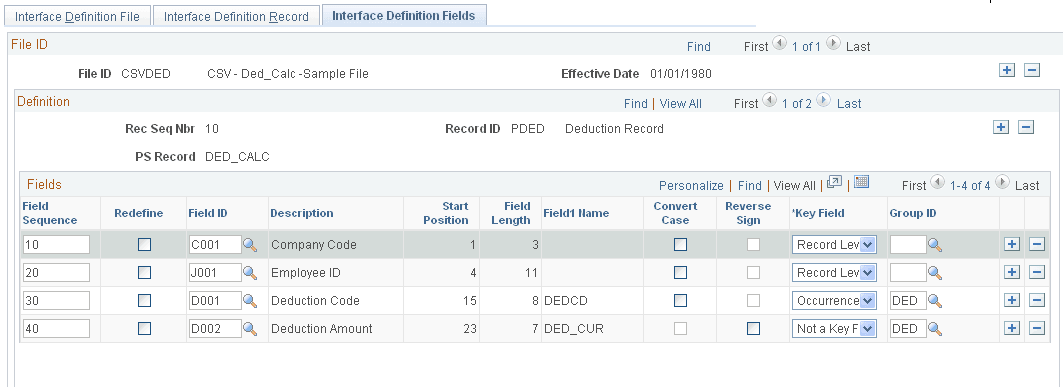
This example of the Interface Definition Fields page shows a sample interface definition used for import.
This example of the Interface Field1 page shows a sample field ID used for import.
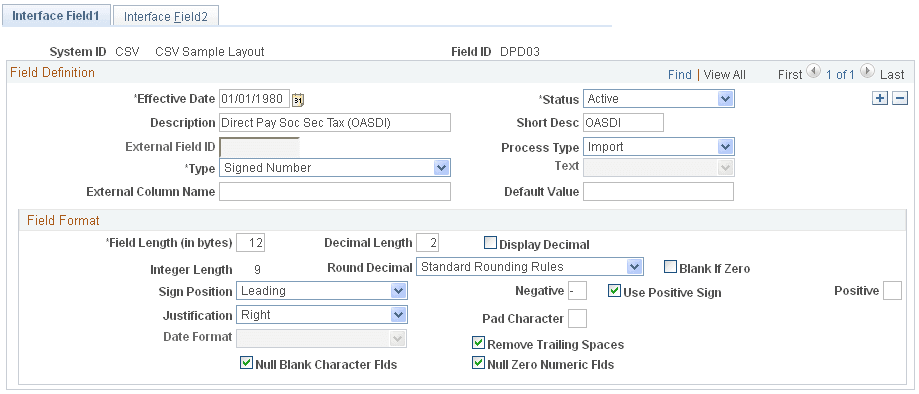
As shown in this example of the Interface Field1 page group ID D03 is attached to the field ID DPD03.