Making Temporary Assignments
You can make temporary assignments in order to help you group your clauses when the default processing is not the desired method. There are predefined temporary variables that you can use in custom statements in order to reference intermediate results later in the same statement.
This example illustrates temporary variable assignment on the Benefit Formula page.
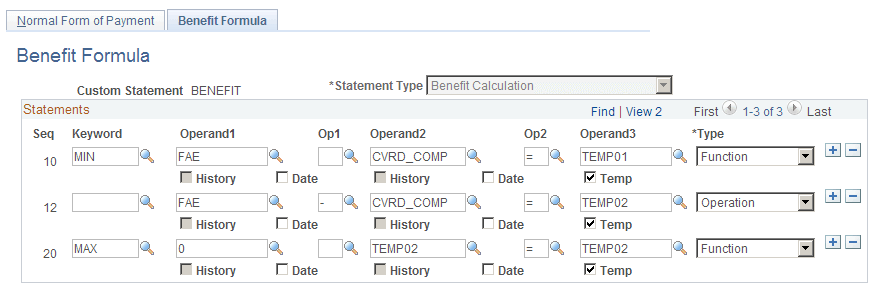
In the example shown, clause 30 references the temporary variable that you created in clause 20. You can assume that later clauses will reference the temporary variables you created in clauses 10 and 20, since that is the only reason to set them up in the first place.
Notice that the example uses the same temporary variable, TEMP02, in clauses 20 and 30. Once you reuse the name in clause 30, the value that it had in clause 20 can no longer be referenced.
When you set up a temporary assignment, assign one of the following predefined temporary variables:
-
For characters and dates, use TEMPC00 through TEMPC99.
-
For numbers, use TEMP00 through TEMP99.
If you select the Temp check box under the Operand3 field, you can press F4 to display a list of the temporary variables when your cursor is in the Operand3 field. You do not, however, have to select the Temp check box in order to use a temporary variable. You can just type it. Because this is just a data entry aid, the mark in the check box is not preserved when you close and open the page.
You can set up separate custom statements for each temporary variable. If you do this, however, the variable is no longer temporary. For example, if a benefit formula is the maximum of Benefit A and Benefit B, you can set up custom statements for each of the component formulas and then reference them from the Benefit Formula statement. This approach can help you shorten some custom statements. In addition, this is the most efficient way to set up aliases when you need the intermediate values for other purposes.
The intermediate results are not shown in the calculation worksheet, regardless of whether you use temporary variables or standalone custom statements. In order for the worksheet to display the values, you have to set up each component as a benefit formula function result.