The Create Job Opening Page and the Manage Job Opening Page
The Job Opening page (HRS_JOB_OPENING) is the main data entry page for job opening details. This page appears when you create a new job opening or when you access an existing job opening that is in either Draft, Pending Approval, or Denied status.
However, when you access an existing job that is (or was) in Open status, it appears on the Manage Job Opening page (HRS_JO_360). On this page, additional tabbed sections and toolbar buttons enable you to manage the recruiting process. The job opening data that you entered on the Job Opening page is consolidated under a Details tab.
This illustration shows that the tabs on the Job Opening page are rendered on the Manage Job Opening page as subsection links under the Details tab.
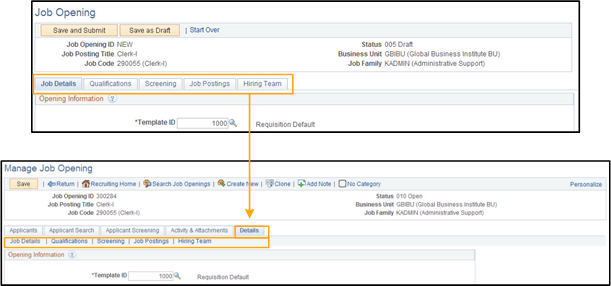
When you click the Details tab on the Manage Job Opening page, the system is actually displaying the Job Opening page rendered to match the look and feel of the Manage Job Opening page.