Date Facet Configuration for Candidate Gateway
If you are using PeopleTools 8.54 or later, advanced settings for date facets enable you to set up filters consisting of relative date ranges such as Within the Last Week or In less than 7 days.. Oracle suggests using these settings to configure the following Candidate Gateway facets for greater usability:
-
Configure the Jobs Posted Within facet to use filter values such as Last Week, Last Month, and so forth.
-
Configure the Job Closing In facet to use filter values such as Less than 7 days, Less than 30 days, and so forth.
This configuration is recommended for Fluid Candidate Gateway when the system is configured to display the Close Date field on the Search Jobs page.
The previous section in this topic lists the overall steps for configuring facets. This section shows the recommended advanced settings for the two Candidate Gateway date facets.
Jobs Posted Within Facet
The delivered facet for the posting date in Candidate Gateway is the Jobs Posted In facet, which filters postings by year and then by month.
This example illustrates the delivered Jobs Posted In facet in Classic Candidate Gateway. Initially, this facet lists years. When a user filters using a specific year, the facet lists months.
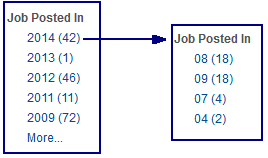
The facet is delivered this way to support Classic Candidate Gateway implementations that use older versions of PeopleTools.
If you are using Fluid Candidate Gateway, or if you use Classic Candidate Gateway on PeopleTools 8.54 or later, Oracle suggests removing the delivered facet and replacing it with the Jobs Posted Within facet, which you can configure to for relative dates such as Last Week.
This example illustrates the Jobs Posted Within facet in Classic Candidate Gateway.
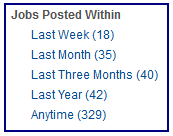
To set up the Jobs Posted Within facet, use the Advanced Facet Settings page to define the relative date ranges to use.
This example illustrates the Advanced Facet Settings page with the appropriate data for the Jobs Posted Within facet.
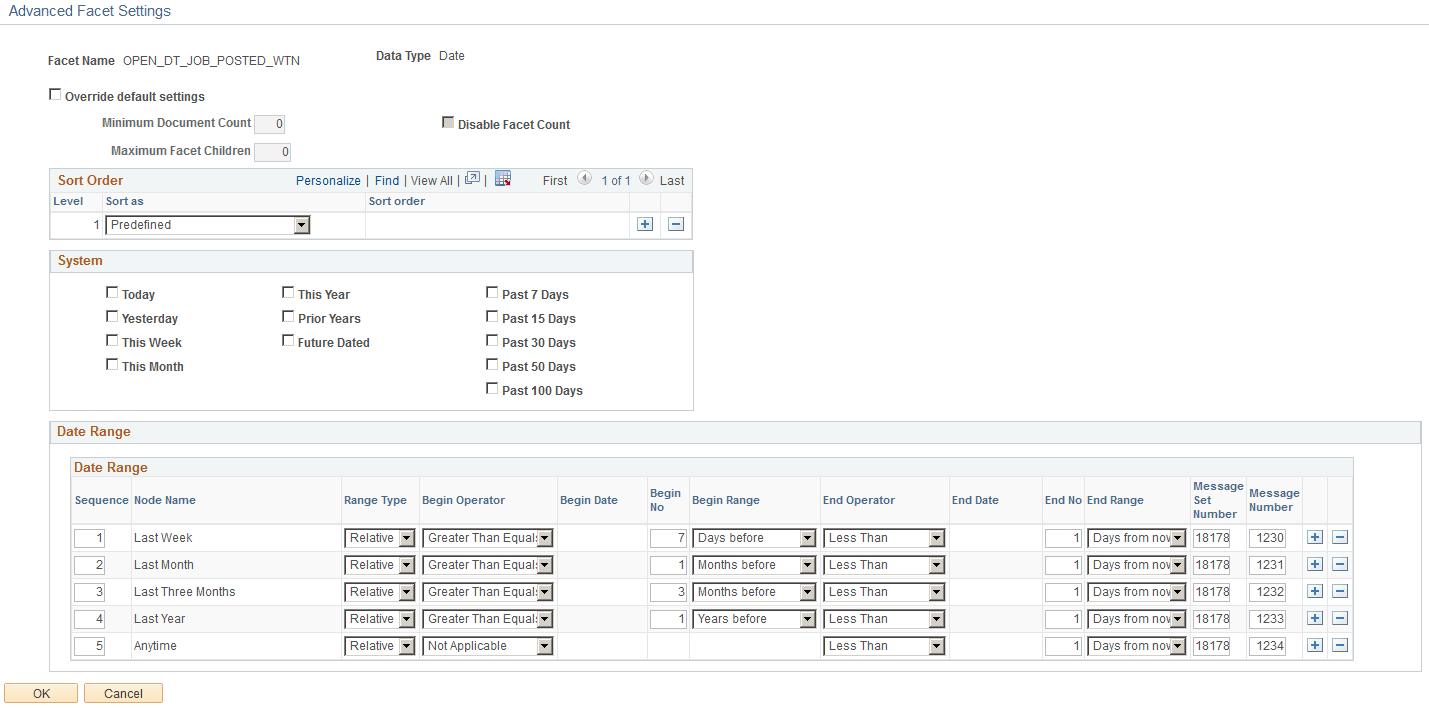
Enter Predefined as the sort order, then enter the following information in the Date Range grid. Note that you do not enter anything in the Node Name field because the node name comes from the Message Number.
| Seq. | Range Type | Begin Operator | Begin No | Begin Range | End Operator | End No | End Range | Message Set Number | Message Number |
|---|---|---|---|---|---|---|---|---|---|
|
1 |
Relative |
Greater Than or Equals |
7 |
Days Before |
Less Than |
1 |
Days From Now |
18178 |
1230 (Last Week) |
|
2 |
Relative |
Greater Than or Equals |
1 |
Months Before |
Less Than |
1 |
Days From Now |
18178 |
1231 (Last Month) |
|
3 |
Relative |
Greater Than or Equals |
3 |
Months Before |
Less Than |
1 |
Days From Now |
18178 |
1232 (Last Three Months) |
|
4 |
Relative |
Greater Than or Equals |
1 |
Years Before |
Less Than |
1 |
Days From Now |
18178 |
1233 (Last Year) |
|
5 |
Relative |
Not Applicable |
Blank |
Blank |
Less Than |
1 |
Days From Now |
18178 |
1234 (Anytime) |
Job Closing In Facet
If you configure Fluid Candidate Gateway to display the close date for each posting, consider setting up the Job Closing In facet so that applicants can filter jobs based on the close date.
Note:
Fluid and Classic Candidate Gateway use the same search category and the same facet settings. However, Classic Candidate Gateway cannot be configured to show the posting close date. Although organizations that use Classic Candidate Gateway can still configure the closing date facet to appear, doing so could confuse applicants because they cannot see the close dates for individual job postings.
When you set up the Job Closing In facet using the instructions in this topic, you use the Advanced Facet Settings page to define the relative date ranges to use.
This example illustrates the Advanced Facet Settings page with the appropriate data for the Job Closing In facet. The Date Range data is also described in the following table.
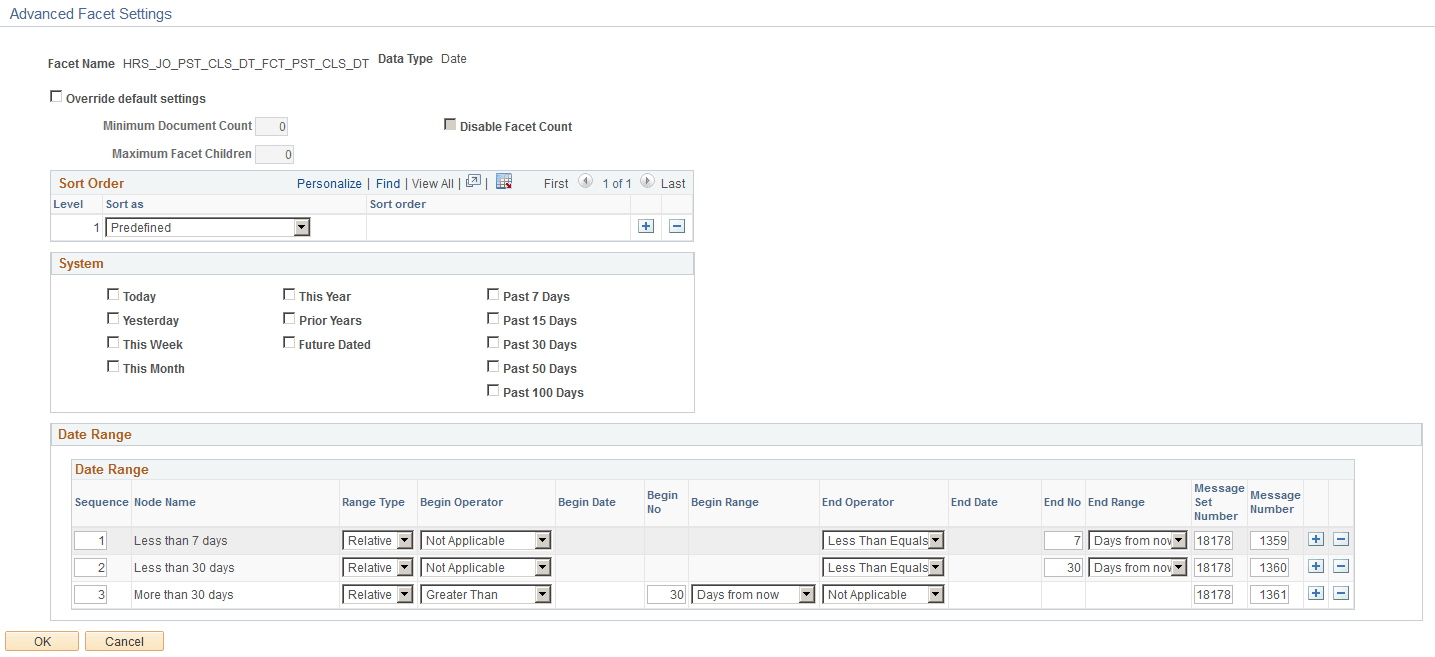
Enter Predefined as the sort order, then enter the following information in the Date Range grid. Note that you do not enter anything in the Node Name field because the node name comes from the Message Number.
| Seq. | Range Type | Begin Operator | Begin No | Begin Range | End Operator | End No | End Range | Message Set Number | Message Number |
|---|---|---|---|---|---|---|---|---|---|
|
1 |
Relative |
Not Applicable |
<blank> |
<blank> |
Less Than Equals |
7 |
Days From Now |
18178 |
1359 (Less than 7 days) |
|
2 |
Relative |
Not Applicable |
<blank> |
<blank> |
Less Than Equals |
30 |
Days From Now |
18178 |
1360 (Less than 30 days) |
|
3 |
Relative |
Greater Than |
30 |
Days from now |
Not Applicable |
<blank> |
<blank> |
18178 |
1361 (More than 30 days) |