Global Search for Job Postings
This section describes the search results when you use Global Search to search for job postings.
This example shows search results from a Global Search for job postings. In this example, the user is a recruiter who can see both internal and external postings. The related actions menu for an internal posting is expanded so that you can see the available actions. The presence of the Manage Job Opening action indicates that the user has access to the Manage Job Opening page (and to the specific job opening). The presence of the other related actions indicates that the user has access to Candidate Gateway pages. This example shows the PeopleSoft Fluid User Interface version of the search results page.
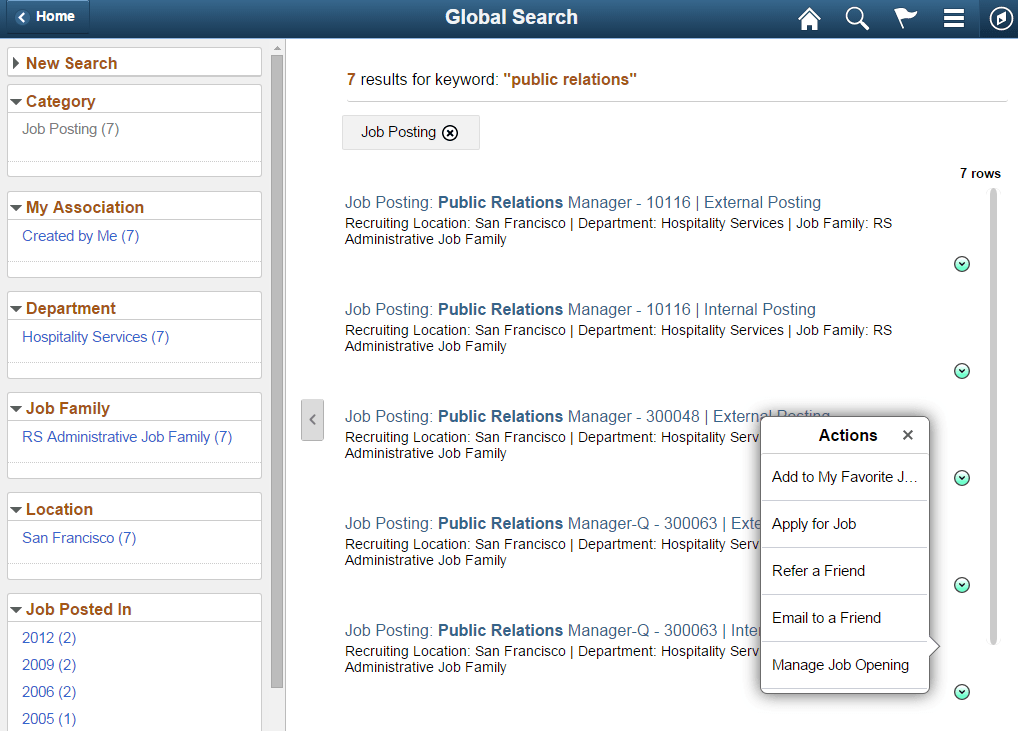
Note that a job opening can have multiple postings. For example, the search results can show both an internal posting and an external posting for the same job opening. However, non-recruiters do not see external postings in their search results.
The following table describes the results of a Global Search for job postings.
| Job Posting Search Results Area | Description |
|---|---|
|
Page accessed when you click the link for a search result. |
The link goes to different pages depending on the user:
|
|
Related actions |
If the user has access to Candidate Gateway pages and the posting is internal, these actions are available:
These are the same actions that applicants can perform on the Job Description page in Candidate Gateway. If the user has access to the Manage Job Opening page and the user has security access the job opening, then the Manage Job Opening action is also available. This action provides direct access to the Manage Job Opening Page. |
|
Facets |
|