Personalize Recruiting Manager Summary Page
Use the Personalize Recruiting Manager Summary page (HRS_PE_OPR_MGR) to choose the time period to include in the recruiting manager metrics and to set filter options to control which types of applicants and job openings are included.
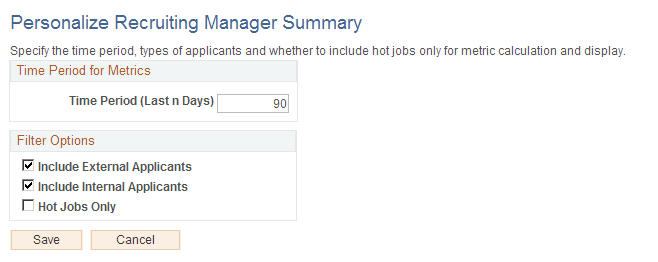
This example illustrates the Personalize Recruiting Manager Summary page.
Time Period for Metrics
| Field or Control | Description |
|---|---|
|
Time Period (Last n Days) |
Enter the number of days before today that the time period for recruiting manager metrics starts. The default value is 90. |
Filter Options
| Field or Control | Description |
|---|---|
|
Include External Applicants and ‘Include External Applicants |
Select one or both of these check boxes to indicate which types of applicants to include in recruiting manager metrics. The default setting is for both check boxes to be selected. |
|
Hot Jobs Only |
Select this check box to exclude job openings that are not hot jobs from the recruiting manager metrics. This check box is deselected by default. |