Quick Search (Classic) Pagelet
Use the Quick Search (Classic) pagelet (HRS_PE_SRCH) to perform quick applicant and job opening searches.
This example illustrates the Quick Search (Classic) pagelet.
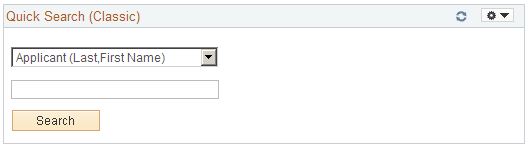
Use this pagelet to initiate a search for either applicants and job openings. Select a search option in the top field, then enter a corresponding value in the lower field and click Search to view search results on the appropriate Talent Acquisition Manager page.
Search options include:
-
Applicant (Last, First Name): Enter the applicant's last name and then first name, then search to view the search results on the Search Applicants page: Quick Search tab.
-
Hiring Manager (Name): Enter the hiring manager's first and last name, then search to view a list of job openings that are associated with the hiring manager. Results appear on the Quick Search (Classic) Results page.
-
Job Opening ID: Enter the job opening number, then search to view the search results on the Search Job Openings page.
-
Keywords: Enter text that you want to search for in a resume, then search to view the search results on the Search Applicants page: Keyword Search tab.