Common Elements Used in this Topic
| Field or Control | Description |
|---|---|
|
|
Refresh the Pivot grid reports and details to view the relevant and latest data. |
|
|
Use this Options Menu to perform the actions like View Pivot Grid, Update Filters, Export Data, Chart Options, and Save. |
|
|
Show filters on the left panel to display the Enrollment Group, Location, Business Unit, Department and Company. |
|
|
Select to hide the filters. |
|
|
Perform the action of Posting, Mark for Processing or Rejecting enrollments at an employee level (one transaction at a time). The user can view the Enrollment Group and Notify the recipients using different delivery methods. |
|
|
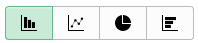
Click to display data in the chart type represented by the icon. Available chart types include vertical bar, line, pie and horizontal bar. |
|
|
Activate and perform the actions related to multiple transactions. |


For more information on pivot grid functionality, see the product documentation for PeopleTools: Pivot Grid.