Defining the Initial Period of Interest
After you have specified the population you want to process, Time Administration determines the start (START_DT) and end dates (END_DT) of the initial period of interest for batch creation. This initial period represents the minimum amount of time that must be processed for each time reporter you run through Time Administration. This data is stored in the TL_TA_TRLIST table along with each time reporter's EMPLID and EMPL_RCD.
Important:
The explanation of the initial period of interest above, assumes that the Use Reported Time for POI check box on the Process Time Admin page is selected. For an explanation of what happens when the check box is cleared, see the Process Time Admin page.
Note:
The initial period of interest start (START_DT) and end (END_DT) dates contained in the TL_TA_TRLIST Table are referenced in Step 2, Combining Time Reporters into Batches, and are used to help group the population you are processing into batches.
The following table lists the critical fields in the TL_TA_TRLIST table:
| Field | Use |
|---|---|
|
BATCH_NUM |
This number represents the initial assignment of time reporters to a batch for processing. |
|
EMPLID |
Identifies the time reporter to be processed. |
|
EMPL_RCD |
Identifies a specific job or position. |
|
START_DT |
This is the start of the initial period of interest. |
|
END_DT |
This is the end of the initial period of interest. |
|
EARLIEST_CHGDT |
This is the earliest date of reported time for the time reporter. |
|
RUN_CNTL_ID |
This is the run control ID entered on the run control page for Time Administration processing. |
To determine the START_DT and END_DT contained in this table (the initial period of interest for batch creation), the selection process does the following:
-
It determines the EARLIEST_CHGDT for the time reporter being processed.
-
It identifies the time reporting period (based on the Time Period ID in the workgroup table) intersected by the EARLIEST_CHGDT.
-
It uses the begin and end dates of the time reporting period intersected by the earliest change date as the begin and end dates of the initial period of interest. The selection process then queries the reported time tables (both punch and reported) to see if time has been reported for a future date (that is, a date following the time reporting period). If so, the end date of the initial period of interest is set to the last date of reported time.
The start and end date information in this table is used in Step 2—Combining Time Reporters into Batches.
Example: Determining the Initial Period of Interest
Suppose that the EARLIEST_CHGDT for the time reporter you are processing is 2 February 2000, and you run Time Administration on 7 February 2000 (the current date). Assume that the time reporting period associated with this time reporter's workgroup is weekly, and that the week is defined to begin on Monday and end on Sunday. The timeline for this time reporter would look like this:
This graphic illustrates the example: Determining the Initial Period of Interest
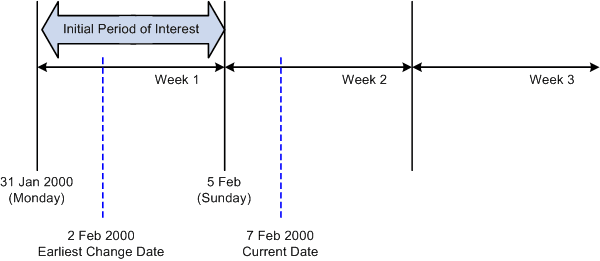
As you can see from the timeline, the EARLIEST_CHGDT for the time reporter intersects a weekly calendar period that begins on January 31, 2000 (Monday) and ends on February 5, 2000 (Sunday). The system uses the begin and end dates of this week to establish the initial period of interest: January 31 − February 5.