Understanding Project Costing Integration
Project Costing acts as a central repository for all project data. It enables your organization to capture project costs, keep projects within budget, issue bills for projects, and assess project profitability. When you use the Time and Labor task reporting functionality and integrate Time and Labor with Project Costing, you can:
-
Track time for the projects, activities, business units, resource types, resource categories, and resource subcategories defined in Project Costing. You accomplish this by including project-related task entities in your task templates and task profiles.
-
Publish, or send, estimated project-related costs to Project Costing. This feature can be helpful when your organization bills projects off-cycle from the payroll process.
-
Publish actual project-related costs to Project Costing when a payroll cycle is complete. To use this feature, you must run your payroll through a payroll system that integrates with Time and Labor, such as Payroll for North America or Global Payroll.
You can also use the following optional features to:
-
Restrict time entry so that time reporters can only report time to projects on which they are team members.
-
Create a rule that causes the Time Administration process to generate an exception when it processes time reported to closed projects.
-
Track time and cost data by ChartField for both accounting and commitment accounting.
This diagram illustrates the process flow in Project Costing
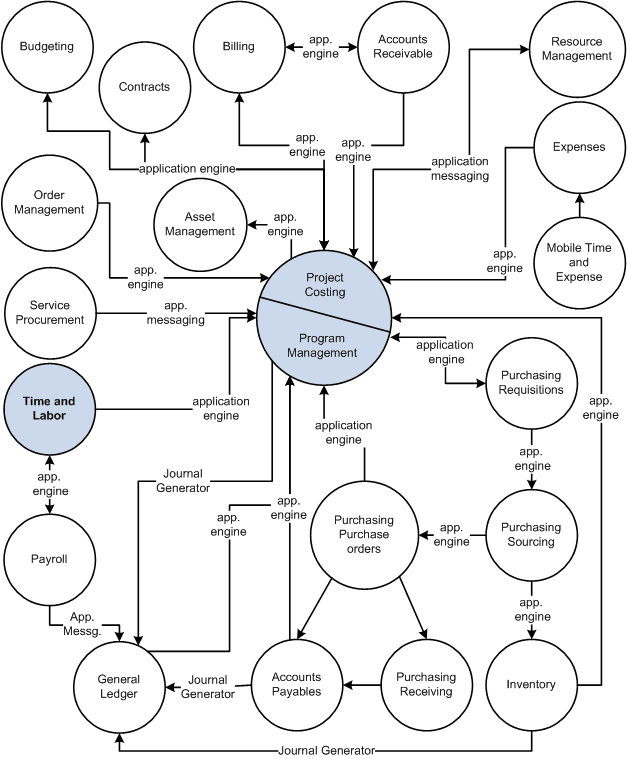
Data Published to Project Costing
When Time and Labor publishes data to Project Costing, it sends the fields in the payable time record and the following data:
-
All related ChartFields if a combination code is reported.
-
The TRC type (hours, units, or amount) and unit of measure related to the TRC.
-
The General Ledger business unit that is associated with the reported or default Human Resources business unit.
PeopleSoft Financials can use the business unit for currency conversion.
-
The job code of the time reporter.
Project Costing can use the job code within the rate templates used for billing.
-
The Send Time to Payroll value (TL_TIME_TO_PAY).
Send Time to Payroll is populated with N if the payable time is for contractors; Y if the time is sent to a payroll system.
-
The Accounting date of the Time and Labor cost transactions that are synchronized with the accounting period in Project Costing, as well as with the accounting period for other costs that are posted in General Ledger.
See PeopleSoft FSCM Project Costing for more details.