2.15.2 Defining Security for Search Groups to Display in Global Search Bar
The table below lists the permission lists and the search groups:
| Permission List | Permission List Description | Search Group | Search Group Description |
|---|---|---|---|
|
PAPP5600 |
Access Action Items |
PAPP_ACTION_ITEMS |
Action Items |
|
PAPP5710 |
Access Blogs |
PAPP_BLOG |
Blogs |
|
PAPP5500 |
Access Community Calendars |
PAPP_CALENDAR_EVENTS |
Calendar Events |
|
PAPP4810 |
Access Discussion Forums |
PAPP_DISCUSSIONS |
Forums |
|
PAPP5300 |
Access Workspaces |
PAPP_CW_WORKSPACES |
Workspaces |
|
PAPP2000 |
Access Published Content |
PAPP_CONTENT_PUB |
Content |
|
PAPP2000 |
Access Published Content |
PAPP_CONTENT_PUB_ARC |
Content Archived |
|
PAPP2010 |
Access Content Management |
PAPP_CONTENT_CRAWLED |
Content Crawled |
|
PAPX0000 |
Base Repository Objects |
PAPP_RESOURCE_FINDER_PARTICIPANT |
Resource Finder Participant |
|
PTPT1000 |
PeopleSoft User |
PTPORTALREGISTRY |
MENU |
These permission lists need to be assigned to the users through roles so that they have access to the corresponding Search Groups.
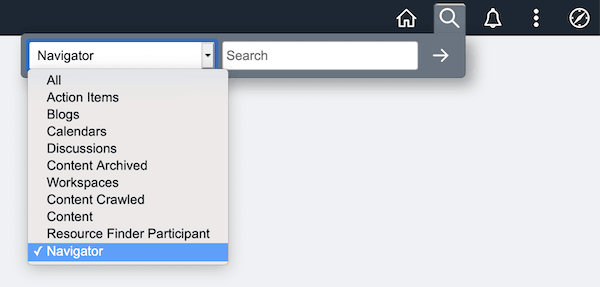
Global Search Bar will be displayed only if the current user has access to at least one Search Group that is deployed successfully. This example shows several delivered Search Groups and the Global Search bar.
Figure 2-20 Global Search Bar displaying the delivered Search Groups
For importing remote Search Groups to display in Global Search Bar, see the PeopleSoft PeopleTools product documentation.
See PeopleTools: Search Technology, “Administering PeopleSoft Search Framework,” Importing Remote Search Groups.
To import Remote Search Groups using Automated Configuration Management, PeopleTools delivers the Remote Search Group Configuration plug-in, which is grouped under the template CLUSTER_TEMPLATE.
See PeopleTools: Administration Tools, “Automated Configuration Management,” for information on running a template.
See PeopleTools: Search Technology, “Working with PeopleSoft Search,” Working with Global Search, for information on working with Global Search.