Data Maintenance Page
Use the Data Maintenance page (EO_EIP_CTL_MAINT) to test the error handling utility.
Test subscription processes must error out. Create a message subcontract with Error status, or create a stage-based incoming transaction with a status value of 1 (Error).
Navigation:
This example illustrates the fields and controls on the Data Maintenance page. You can find definitions for the fields and controls later on this page.
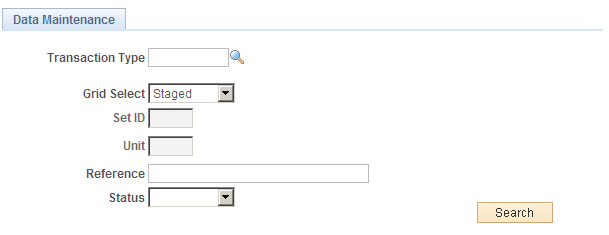
Use this page to test the error handling utility.
Test subscription processes must error out. Create a message subcontract with Error status, or create a stage-based incoming transaction with a status value of 1 (Error).
Note:
Error conditions depend on processes that are specific to the application.
The Review Centralized Error page features the following page elements:
| Field or Control | Description |
|---|---|
|
Transaction Type |
These values are provided by your application. |
|
Grid Select |
Select whether the errors you want to check are queue-based, stored in a staging table, or select and search for a specific error. |
|
SetID |
Enter a setID. |
|
Unit |
Enter the unit of measure. |
|
Reference |
Enter a reference name. |
|
Status |
Select from Cancelled, Complete, Error, Hold, In Process, Incomplete, New and Reprocess. |
|
|
Click the Show Detail Entry icon to transfer to the application page for necessary error-correction activities. |
