Analytic Server Process Flow and Behavior
PeopleSoft session activity, such as a user action, a component interface operation, or a message subscription, launches PeopleCode that requires the application server to invoke the analytic calculation engine or the optimization engine to process an analytic instance.
The database maintains a list of all the available PSANALYTICSRV (analytic server) instances, their status, and any analytic instances currently loaded, so it can properly select analytic server instances for new analytic instances, and direct subsequent requests to the proper analytic server instance. When an analytic server instance starts, the database is updated.
When a running program requests the creation of an analytic instance, the analytic server framework considers all available PSANALYTICSRV instances in the same application server domain and allocates one of them from the pool of idle server instances to handle this particular analytic instance. Any further load or recalculate operations requested by the application for this analytic instance are directed back to the same analytic server instance for processing.
Note:
If there are no idle server instances, the analytic server framework can spawn additional server instances up to a maximum limit that you can define in the application server domain configuration. If this maximum is reached, the system attempts to allocate a server instance from a running analytic server in another domain.
This example illustrates the analytic server architecture, including the database, application server, web server, web browser, analytic server, application engine server, and process scheduler server.
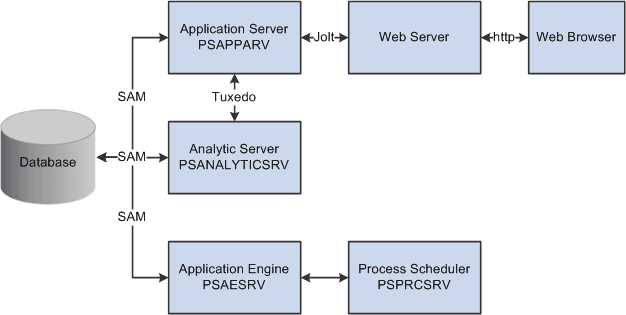
After an analytic server instance takes over processing the analytic instance, that processing becomes independent of the status of the application server. The core functionality provided by the analytic server framework is the ability to host analytic instances for an indeterminate amount of time in an environment where that data can persist across multiple sessions, and where that data can be accessed without requiring its entire content to be transferred from server to client and back.
Analytic Instance Access
Access to the analytic instances maintained by the analytic server environments is supported only through PeopleCode programs. The environments in which PeopleCode can run include:
-
The application server (PSAPPSRV).
-
PeopleSoft Application Engine accessed by PeopleSoft Process Scheduler (PSAESRV or psae)
-
PeopleSoft Application Engine run from the command line (psae).
An allocated server instance doesn't need to be running in the same Tuxedo domain or on the same server machine as the application server. Once it's allocated, the initiating user is redirected to an application server that's running on the same domain and server machine as the analytic server.
PeopleCode that's running in any PSAPPSRV process can access analytic instances that were loaded by any other PSAPPSRV process, regardless of the Tuxedo domain in which it's running. When the program requests access to such an analytic instance, the running PeopleCode program is restarted and the web server is notified to redirect the request back to an application server within the Tuxedo domain where the analytic instance is loaded. This application server is then able to directly contact the PSANALYTICSRV server with the loaded analytic instance.
Note:
PeopleCode that's running in a given Application Engine environment can access only analytic instances that were loaded in the same process.
Secondary Database Connection
A secondary database connection is used to prevent unexpected table locks when you run an analytic calculation. The secondary connection isn't opened until an analytic instance is referenced in a PeopleCode program. A secondary connection is required regardless of whether the analytic calculation is run by an application engine program as a batch process or directly by an online application.
By default, the secondary connection is persistent for improved performance. If you find that the persistent connection imposes too much overhead, you can change it to an on-demand connection by setting bit eight of the DbFlags application server and process scheduler domain parameter.
Note:
A non-persistent connection can significantly affect system performance, so consider this setting carefully.
You can use DbFlags bit four to disable the secondary connection altogether, but analytic instance processing requires it, so ensure that DbFlags does not have bit four set.
Errors and Abnormal Process Termination
Any errors that occur while processing an analytic server request result in the PeopleCode program returning an error code or throwing a PeopleCode exception.
If an analytic server instance that's hosting an analytic instance terminates unexpectedly, the loaded analytic instance is lost and unrecoverable. However, the analytic instance status still appears on the Analytic Server Administration pages. The domain monitor (PSMONITORSRV) discovers the unexpected termination and cleans up the status information.