Association Data Cubes
An association data cube is a data cube that is formatted as a member of a dimension and has one or more attached dimensions. An association data cube associates two dimensions, enabling the end user to group members of one dimension into categories that are defined by the members of a different dimension. When an association data cube receives its values from dimension members, it can be considered to be a type of input data cube. When an association data cube receives its values from a calculation formula, it can be considered to be a type of calculation data cube.
Association data cubes can exist in all types of cube collections.
Example: Creating the DEPT_TO_REGION Association Data Cube
This example associates the DEPTID dimension with the REGION dimension. The following table lists the members that are included in each dimension.
| DEPTID Dimension Members | REGION Dimension Members |
|---|---|
|
Note: In the application, the end users group or categorize these members by categories that are defined by the members of the REGION dimension. |
Note: In the application, the end users select members from this dimension to group members of the DEPTID dimension. |
|
AUS01 |
APAC |
|
AUS02 |
LATAM |
|
BRA01 |
NAMER |
|
CAN01 |
EUROP |
|
EUR01 |
N/A |
|
GBR01 |
N/A |
|
JAP01 |
N/A |
|
JAP02 |
N/A |
|
MEX01 |
N/A |
|
USA01 |
N/A |
|
USA02 |
N/A |
This association enables the end user to group the members of the DEPTID dimension into categories that are defined by the members of the REGION dimension.
To create the DEPT_TO_REGION association data cube:
-
Create a new data cube named DEPT_TO_REGION.
-
Format the data cube as a member of the REGION dimension.
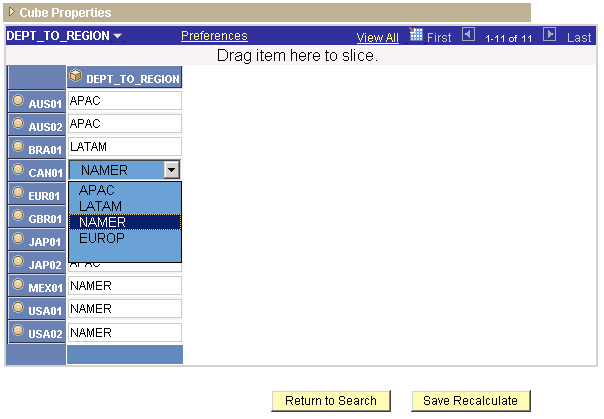
This dimension contains the categories that the end user will use to group the members of the DEPTID dimension. These members appear in the right-hand column of the data cube's data. The end user can select these members from a drop-down list box.
-
Attach the DEPTID dimension to the DEPT_TO_REGION association data cube.
This dimension contains the members that the end user will group or categorize. These members appear in the left-hand column of the data cube's data.
This example shows an association data cube and its drop-down list box in an analytic grid.