Example: Working with an Analytic Type and an Analytic Model
The following example illustrates the typical process for creating an analytic type definition to be used with a new analytic model. In this example, you create an analytic type definition called QE_ACE_DGCPROB and define the records that are used in the analytic model. You insert all of these records (except derived/work records) into the analytic type definition and set the attributes of the records.
Note:
For simplicity, this example maps only one cube collection to a main record, although the analytic model definition in this example contains several records which would be used with several cube collections. The record used in this example is mapped to a read/write cube collection for loading data from the database, receiving end user input, and persisting data back to the database.
See Understanding Cube Collections.
To create an analytic type definition to be used with a new analytic model:
-
Define the records within the QE_ACE_DBCPROB analytic type definition.
Example of defining the records within the QE_ACE_DBCPROB analytic type definition.

-
Using the information in the following table, you create an analytic model definition called QE_ACE_DGCMODEL, with data cubes and dimensions that are related in this manner.
Data Cube Attached Dimensions SALARY input data cube
These dimensions are attached to the SALARY data cube:
-
BUSINESS_UNIT
-
DEPTID
-
EMPLID
-
JOBCODE
EXPENSE input data cube
These dimensions are attached to the EXPENSE data cube:
-
BUSINESS_UNIT
-
DEPTID
-
EMPLID
-
JOBCODE
BONUS_PERCENT input data cube
These dimensions are attached to the BONUS_PERCENT data cube:
-
BUSINESS_UNIT
-
DEPTID
-
EMPLID
-
JOBCODE
Note:
At this step in the process, you do not create the analytic model definition's cube collections.
-
-
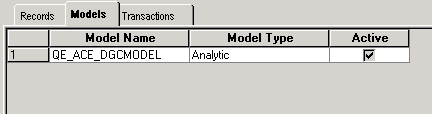
On the Models tab, you associate the QE_ACE_DBCPROB analytic type to the QE_ACE_DGCMODEL analytic model.
Example of associating the QE_ACE_DBCPROB analytic type to the QE_ACE_DGCMODEL analytic model.
-
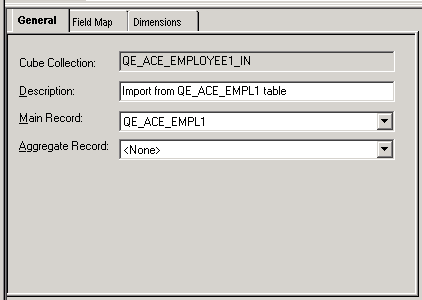
You open the analytic model definition and create a read/write cube collection called QE_ACE_EMPLOYEE1_IN.
-
On the General tab of the cube collection's properties, you map the cube collection to the QE_ACE_EMPL1 main record.
Example of mapping the QE_ACE_EMPLOYEE1_IN cube collection to the QE_ACE_EMPL1 main record.
Note:
This cube collection does not use an aggregate record.
-
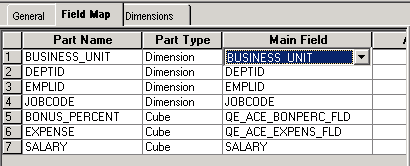
On the Field Map tab, you map the fields in the QE_ACE_EMPL1 record to the data cubes and dimensions.
Example of mapping data cubes and dimensions to the fields of the QE_ACE_EMPL1 record.
Note:
When mapping dimensions and data cubes, you may want to map dimensions to the key fields in the main record and data cubes to the non-key fields in the main record. The PeopleSoft system, however, does enable you to map dimensions to non-key and data cubes to key fields. To perform the most appropriate mapping, you must have a deeper understanding of the relationship between data cubes and dimensions.