PeopleSoft Application Designer Window Components for Creating Analytic Model Definitions
Navigation:
This is an example of PeopleSoft Application Designer interface that is used for creating analytic model definitions.
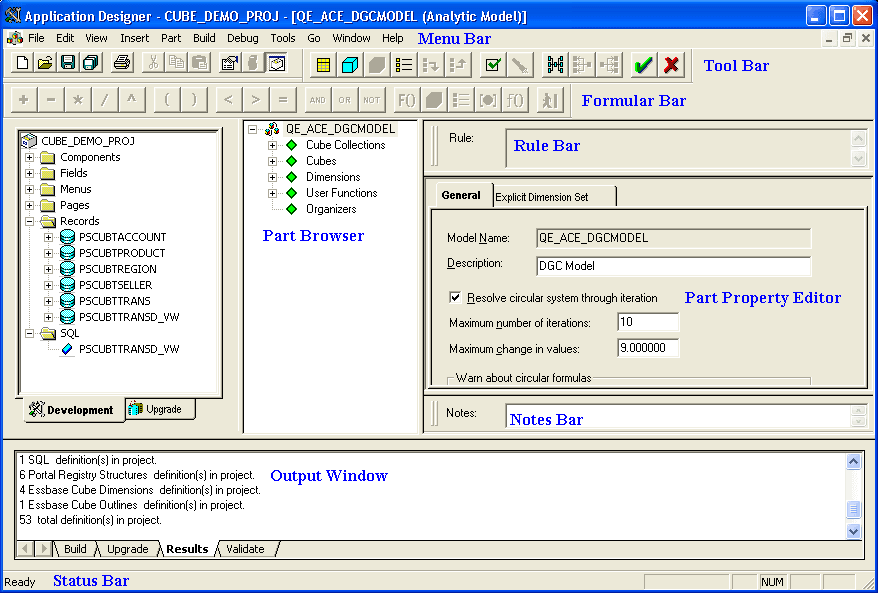
| Term | Definition |
|---|---|
|
Menu Bar |
Provides access to commands and features that you use to create analytic model definitions. See the Menu Bar section below. |
|
Tool Bar |
Contains buttons that you use to perform common commands and edit the parts of an analytic model definition. |
|
Formula Bar |
Contains buttons that you use to define formulas for data cubes and user functions. |
|
Rule Bar |
Displays the rules for data cubes and user functions. Note: The type of information that appears in the rule bar depends on the part that is currently selected. |
|
Part Browser |
Contains hierarchies that you use to view, organize, and edit an analytic model definition's parts. See the Part Browser section below. |
|
Part Property Editor |
Contains dialog boxes that you use to edit the parts of an analytic model definition. |
|
Notes Bar |
Enables you to enter notes about the different parts of the analytic model definition. |
|
Output Window |
Contains the output text from PeopleSoft Application Designer operations, such as Build (SQL Create and Alter), Find Definition References, Upgrade, Results, Validate, and PeopleCode Log. |
|
Status Bar |
Contains descriptions of buttons and menu commands. |