Types of Dimension Members
Analytic Calculation Engine contains many different types of dimension members. The type of member that exists within a dimension is determined by:
-
Whether a tree is attached to the dimension.
-
The types of leaves or nodes that are mapped to the dimension members.
Note:
Two dimension members should never share the same name unless one member is a detail member and one member is an aggregate member.
Detail Members and Leaf Members
If a tree is not attached to a dimension, Analytic Calculation Engine creates detail members for each value of the field to which the dimension is mapped.
If a tree is attached to a dimension, Analytic Calculation Engine creates detail members out of the tree's detail values to establish a dimension's parent and child relationships (in a tree, detail values can serve as children and parents).
See Tree Manager: Using Detail Values (Leaves).
Note:
When detail values serve as parents, they are also referred to as detail nodes because they do not display aggregated data. Instead, detail nodes usually display the key values of regular transactional tables.
When detail members serve as parents, they do not display aggregated data. Rather, they enable end users to navigate through the hierarchy.
Be aware of these characteristics of detail members' relationship to the main record:
-
Detail member names are either read from the main record or generated from the tree's data.
-
Navigation related functions such as PREV, NEXT, and PREVSELF operate on detail member names that are persisted in the main record.
These functions do not use trees to determine the order of members.
A leaf member is a special type of detail member that does not have children.
For example, suppose an end user enters 20040101 as a new detail value. Analytic Calculation Engine generates a new 20040101 leaf member. This is a leaf member because its corresponding detail value does not have any children.
Aggregate Members
Aggregate members are mapped to the nodes of a tree that have either children or leaf ranges. Aggregate members display a grouping of data, rather than a specific discrete value.
For example, suppose an analytic model's DATE dimension is mapped to a tree that contains 20040101 as a leaf node and Q12004 as a branch node. Analytic Calculation Engine generates the Q12004 aggregate member out of the branch node.
The analytic calculation engine creates aggregate members out of any tree elements that remain after it creates the hierarchy's detail members.
Hierarchy Root Member
You can map the hierarchy root member to any node that you want to serve as the root of the hierarchy. All sibling nodes or nodes at a higher level of the tree are not used to create the hierarchy. You map the hierarchy root member by using the NodeName parameter of the AttachTree method.
Note:
Only one hierarchy root member can exist per dimension.
Consider this example of a tree's parent-child relationships.
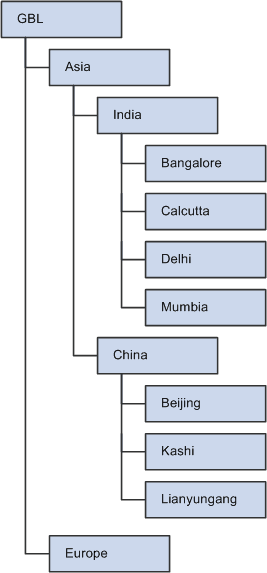
Even though the highest level node is GBL, which is the root node of the tree, you can select the India node to serve as the hierarchy root member for this dimension. When you create the hierarchy root member out of the India node, only the children of India exist in the hierarchy.
If you have not attached a tree to the dimension, a hierarchy root member still exists for that dimension if you specified a root member name for that dimension. If you have not attached a tree to the dimension and you have not entered a value in the Total Member Name field, neither a hierarchy root member nor a hierarchy exists for that dimension.
Orphan Members
An orphan member is any member that does not map to a child of a parent node in the tree.
For each orphan member, Analytic Calculation Engine:
-
Adds each orphan member to the hierarchy root member.
-
Adds each orphan member's value to the hierarchy root value's member.
-
Generates a message with the ID of 123 and stores it in the Messages property for the analytic instance.
You must write PeopleCode to iterate over the messages in the analytic instance and search for message 123, and then take any necessary further action.
Blank Members
A blank member is a member that has no value. Blank members are created out of either an empty detail in a tree or a null cell in the main record. To create blank members:
-
When the analytic model learns of a new empty detail in the tree, it adds the blank member to the appropriate parent member.
-
When the analytic model learns of a null cell in the main record, it adds the blank member as a child of the hierarchy root.
-
When the AddMember method adds a member with a blank member name ( ), a blank member is added as a child of the hierarchy root.
Note:
When blank members are mapped to date fields, they are written to the database as values of 1/1/1900.
Related Topics