Accessing and Using the PeopleCode Editor
PeopleCode is the structured programming language built into PeopleTools that extends the functionality of the PeopleTools environment, enabling you to add business logic to critical application definitions. All PeopleCode programs are associated with and considered a part of the parent definition. When you create, view, or modify a definition, you may simultaneously create, view, or modify its PeopleCode.
You can associate PeopleCode programs with many items, such as record fields, pages, components, Application Engine programs, and so on. You can access any PeopleCode program from its related definition. When you have a definition open in Application Designer, you can access the PeopleCode written for that definition by:
-
Clicking the View PeopleCode button in the toolbar.
-
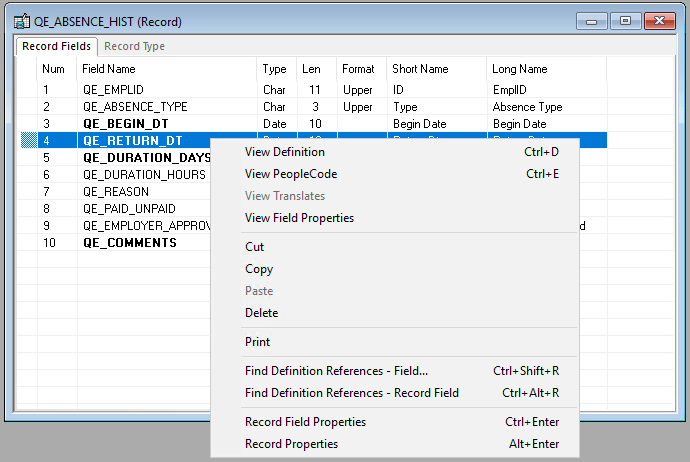
Right-clicking on the definition and selecting View PeopleCode from the popup menu.
| Term | Definition |
|---|---|
|
|
For definitions where PeopleCode can be inserted, the View PeopleCode button appears in the dynamic Application Designer toolbar. Click this button to launch the PeopleCode Editor and view the PeopleCode associated with the current definition. The View PeopleCode button appears for these definition types:
Note: Depending on the definition type, the label of the button and the number of buttons that appear might be different. For example, with pages, you see two buttons: View Page PeopleCode and View Record PeopleCode. |

This example illustrates accessing PeopleCode from the current definition open in the Application Designer workspace. By selecting View PeopleCode from the popup menu, the system launches the PeopleCode Editor displaying the PeopleCode for the selected record field.
To view Record Field PeopleCode there is an additional option:
-
Open a record definition in PeopleSoft Application Designer.
-
Click the View PeopleCode toolbar button to view the PeopleCode display for the record.
-
Locate the field containing PeopleCode in the record definition for which you want to access the PeopleCode.
-
Double-click the cell (the check mark)l under the column heading for the type of PeopleCode that you want to view.
The PeopleCode editor is a text editor that enables you to construct, modify, and review PeopleCode programs and associate them to PeopleSoft definitions and events. The PeopleCode editor enables you to edit and navigate all PeopleCode programs that belong to the same parent definition.
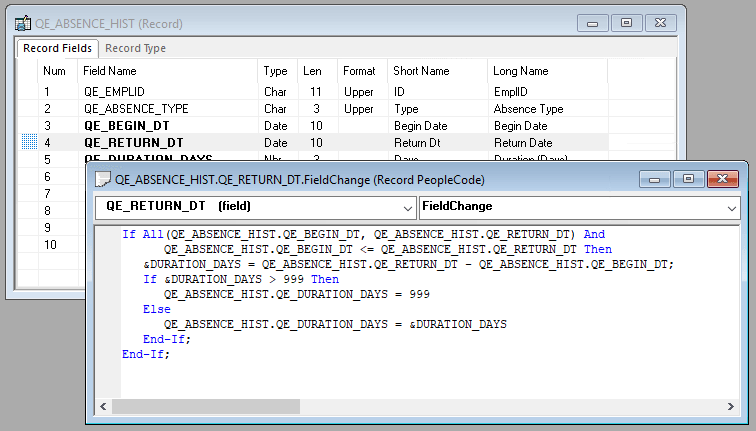
The user interface of the PeopleCode editor consists of two drop-down lists boxes and an area where you enter text. The drop-down list box that is on the left side of the editor is a displays the current field and other available fields, records, and components. Any field with PeopleCode attached appears in bold. The drop-down list box that is on the right side of the editor displays the current PeopleCode event and other events that are appropriate for that definition. Events already containing PeopleCode for that definition appear in bold.
Beneath the drop-down list boxes is where you enter your text. In this area, you can add, delete, and change text and you can use the find and replace function. The PeopleCode editor validates the syntax of your code and the editor automatically formats the code according to PeopleSoft standards when you save the definition.
This example illustrates the fields and controls on the Example of working in the PeopleCode editor. You can find definitions for the fields and controls later on this page.
Note:
You can embed strings in the PeopleCode editor that generate HTML, JavaScript, CSS, and XML markup. However, it is not considered a best practice.
Note:
Multiple programmers may save changes to different PeopleCode programs associated with the same definition. However, the system displays an error if multiple programmers attempt to save the same PeopleCode program associated with the same definition and PeopleCode event.
Note:
With the PeopleCode Editor active, you can select View, Line Numbers to display line numbers to the left of each line in the program, beginning with 001.