Field Formats in a Flat File
A flat file, in the simplest sense, is a collection of fields in text format. The file must be formatted in a way that enables the PeopleCode to locate each field. PeopleSoft file layouts support three formats:
-
FIXED: Each field has a starting position and a length that together specify its location in the file.
This format is the default for new file layouts.
-
CSV: Fields are located in the file by their sequence, separated by commas.
-
XML: Fields are located by the named XML tags that surrounding them, not by their position or sequence within a record.
To preserve relationships between fields, you group fields into logical collections. In relational databases, these collections are records. Each line within a file is a collection of fields.
Note:
With some file formats, the logical concept of a record may actually span multiple physical lines, but the concept of field collections remains.
The conceptual structure of all three file formats is represented in a file layout as follows:
The following is a screen image that explains the conceptual structure of all three file formats in a File layout
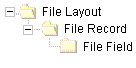
A file layout is a collection of file records, which in turn is a collection of fields, each of which has a describable location.
Note:
To avoid confusion with the standard terms record and field, when working with a file layout we refer to a collection of fields as a file record and to fields as file fields.