Ordering Controls Logically
Tab ordering through a page at runtime is strictly defined by page field ordering. When you add a control to a page, PeopleSoft Application Designer automatically inserts it in the order list based on where you position it on the page. You can manipulate the ordering of fields on your page by moving them up or down on the Order tab in the page definition. In doing so, you also change the tab order that users follow as they move through fields on the page.
In general, field tab order should flow from top left to bottom right on a page. The flow should reflect the way that the eye naturally scans information. On a page with multiple scroll levels, the tab order should follow the scroll level order, from Level 0 to Level 1, and so on.
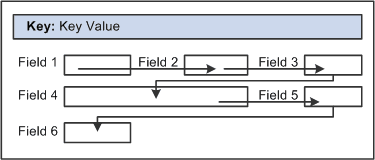
On a page where the fields are not arranged in columns, the tab order should go from left to right on each line from top to bottom as depicted in this figure:
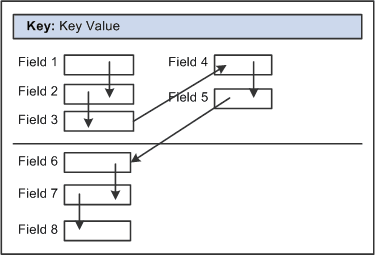
On a page with columns, the tab order should go from the top to the bottom of the first column, then from the top to the bottom of the second column, and so on.
Fields that share the same label should follow consecutively in the tab order from left to right.