Protecting Sensitive Field Data Online
You may not want to expose some field data online, such as passwords, PIN numbers, identification numbers, and so on. For such fields, you can use the Password and Input Only display options to prevent end users from seeing the actual field value.
This example illustrates the Password and Input Only edit box display options.
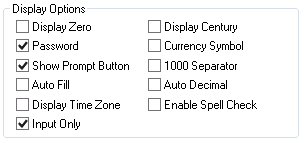
If neither Password or Input Only is selected, the system displays the field data online just as it appears in the database (as normal — in its clear case or encrypted form).
Select Password to mask the field value online with black dots or asterisks (depending on the operating system and/or browser), while having the actual field value available in the page HTML.
Input Only can be selected only if Password is also selected. The Input Only option displays masked characters in the field, but it also prevents the field value from appearing in the page HTML.
In both cases, the user can change the value of the field without ever seeing the value entered or the actual value stored in the database.
Note:
With both options, the actual field value is stored in the panel buffer and can be accessed and utilized as part of normal processing, such as PeopleCode usage.
This example illustrates the online formatting of the field value (black dots) with the Password option selected. The number of masked characters matches the number of characters in the actual field length.
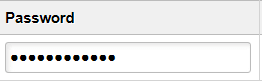
This example illustrates the Input Only option not selected. In this example only Password is selected so just the online page field is affected. Note the field value attribute populated in the HTML.

With the Input Only option selected, the online appearance of the field matches the Password option selection. The HTML appears as follows:
<input name="MCF_USERIM_CFG_MCF_PASSWORD$0" tabindex="166"
class="PSEDITBOX" id="MCF_USERIM_CFG_MCF_PASSWORD$0" style="width:237px;"
type="text" maxlength="254" value="************"></input>
Note the field value is masked also in the HTML.
| Display Option | Online | HTML |
|---|---|---|
|
Password: Not Selected |
Displays field data as stored in the database. If the data is encrypted or hashed in the database, it displays that format. |
The HTML input value attribute contains the same value as the online field. |
|
Password: Selected |
Displays field data as masked characters. |
The HTML input value attribute contains field data as stored in the database. If the data is encrypted or hashed in the database, it displays that format. |
|
Password: Selected Input Only: Selected |
Displays field data as masked characters. |
The HTML input value attribute contains a masked value. |