Setting Column Properties
After you insert the page control or field into your grid, you can set the properties for that field as you would set properties for any other page control. Access the field properties by double-clicking the column heading.
Column headings and their alignment are derived from the label text that you select on the Label tab of the page field properties dialog box. The alignment of column contents is derived from the alignment settings on the Record tab of the page field properties dialog box. If alignment settings aren't available on the Record tab, then the system uses the Label alignment settings. For column headings, use the following guidelines for label alignment. Do not use colons in column labels.
| Field Type | Label Alignment |
|---|---|
|
Push button |
Center Align |
|
Link |
Left Align |
|
Character |
Left Align |
|
Numeric |
Right Align |
|
Check box |
Center Align |
|
Field data |
Auto (automatic) |
Default Image Field Dimensions in Scrollable Grids
When working with scrollable layout grids that include image fields, consider these default behaviors:
-
The default row height is 28 pixels.
-
The header label width determines the default column width.
-
Grid cell dimensions do not resize automatically to accommodate a stored image with dimensions that exceed the default dimension.
If you have images with dimensions that exceed the default dimensions of (28 x (column width)) then users are unable to see the entire image because the grid cell is smaller than the image. To prevent images from being cropped by the page control:
-
Determine and record the dimensions of the largest image in the field.
-
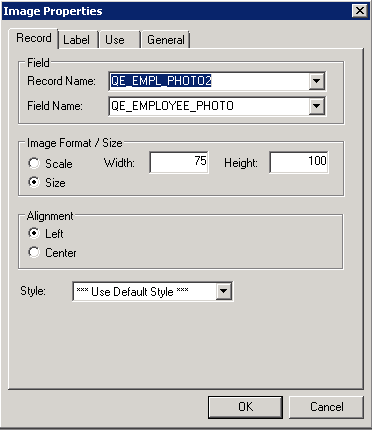
Access the Image properties dialog box of the image page field.
-
On the Record tab, enter the recorded values from step one in the Width and Height fields.
-
Click the OK button and save the page definition.
This example illustrates the fields and controls on the Image Properties dialog box with non-default size values. You can find definitions for the fields and controls later on this page.