Specifying Alter Options
Access the Build Settings dialog box and select the Alter tab.
This example illustrates the fields and controls on the Build Settings dialog box: Alter tab. You can find definitions for the fields and controls later on this page.
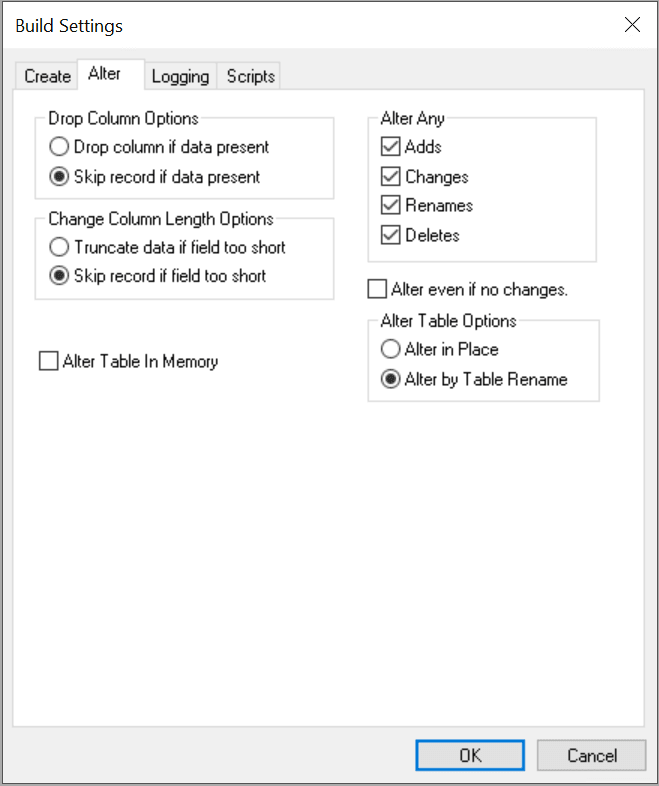
Drop Column Options
These options are referenced whenever a field is deleted from a PeopleTools record definition in which data exists in the database for that column.
| Field or Control | Description |
|---|---|
|
Drop column if data present |
Select to drop the column and data, and write a warning to the build log. |
|
Skip record if data present |
Select to end the alter for that record and write an error message to the log. Processing continues with the next record. |
Note:
Whenever you select the Drop column if data present option, you run the risk of losing data, and you are prompted at runtime to confirm your selection of this option.
Change Column Length Options
Use these options whenever the length of a character column is reduced in PeopleTools and an alter could result in data truncation.
| Field or Control | Description |
|---|---|
|
Truncate data if field too short |
Select to alter the record and write a warning message to the build log. Note that the system does not truncate data for numeric fields because of possible data loss. |
|
Skip record if field too short |
End the alter for that record and write an error message to the build log. Processing continues with the next record. |
Note:
Whenever you select the Truncate data if field too short option, you run the risk of losing data, and you are prompted at runtime to confirm your selection of this option. Also, numeric fields are not truncated to avoid any loss of data.
Alter Table In Memory
If you have selected any of the Oracle In Memory options for your record or record fields, you need to select Alter Table In Memory for those options to take effect and alter the table.
See the Oracle In Memory option for records description here:Setting Use Properties.
See the Oracle In Memory option for record fields description here: Setting Record Field Use Properties.
The following example illustrates the build script generated for a table with All Fields selected on the record definition Oracle In Memory settings, and all record fields contained in that record definition are supported for IM column store processing.
ALTER TABLE PS_QE_JOBCODE_TBL INMEMORY MEMCOMPRESS FOR QUERY PRIORITY
 LOW
/
SELECT COUNT(*) FROM PS_QE_JOBCODE_TBL
/
The following example illustrates the build script generated for a table with All Fields selected on the record definition Oracle In Memory settings, and all record fields contained in that record definition are not supported for IM column store processing.
Alter in memory ALL qe book selective

ALTER TABLE PS_QE_BOOK INMEMORY MEMCOMPRESS FOR QUERY PRIORITY LOW NO
 INMEMORY (QE_BOOK_DESCR, QE_BOOK_COVER_IMG)
/
SELECT COUNT(*) FROM PS_QE_BOOK
Note that the system
adds the NO INMEMORY
(QE_BOOK_DESCR, QE_BOOK_COVER_IMG) statement automatically,
including the fields that are not supported for IM column store processing.
These fields are of type Long Character and Image, respectively.
The following example illustrates the build script generated for a table Selective Fields selected on the record definition Oracle In Memory settings, and all record fields contained in that record definition are not supported for IM column store processing. In this case, the NO INMEMORY statement will include automatically the record fields that are not supported for IM column store processing and the record fields not selected (manually) for IM column store processing.
ALTER TABLE PS_QE_BOOK INMEMORY MEMCOMPRESS FOR QUERY PRIORITY LOW NO
 INMEMORY (QE_ADDED_DT, QE_BOOK_DESCR, QE_BOOK_COVER_IMG, PSIMAGEVER)
/
SELECT COUNT(*) FROM PS_QE_BOOK
/
Alter Any
PeopleTools assumes that you want to perform alters for any modifications made to tables, so, by default, all of the check boxes in the Alter Any group box are selected. The Alter Any group box enables you to customize alter processing for adds, changes, renames, and deletes. For example, you have the flexibility to add, change, and rename fields but not to delete any removed columns. When you complete any other custom external conversion processes, you can then enable the delete processing to drop columns that are no longer defined.
Normally, you select all of these options, but during upgrades or operations requiring data conversion steps you might select a subset of actions. For example:
-
Perform alter with Adds and Changes selected.
-
Perform data conversion routines to populate the new and changed columns (perhaps from columns that are ultimately to be dropped).
-
Perform alter with Rename and Delete selected.
Alter even if no changes
Select this check box to force an alter, even if no changes were made to the tables. This check box is deselected by default. If selected, the Alter by Table Rename option in the Alter Table Options group box is automatically selected and the Alter in Place option is disabled.
Alter Table Options
When altering tables, the alter process takes care of the indexes, regardless of the Alter Table Options you select on the Alter tab of the Build Settings dialog box. In the case of Alter by Table Rename, the indexes are dropped automatically when the temporary table is dropped. For the Alter in Place option, the index creation process goes through the Recreated index only if modified option on the Create tab.
-
Alter in Place
Selected by default. For database platforms in which Alter in Place is not supported, alter is automatically done by Alter by Table Rename (even if that option is not selected).
Database platforms vary in the capabilities for Alter in Place table operations. This table displays the limitations for each operation by platform:
Database Platform Add Column Change Column (data type, size, precision, scale, and null/not null property change) Rename Table Delete Column Microsoft SQL Server
Yes *
Yes *
Yes *
Yes *
Oracle
Yes *
No
Yes
Yes *
Db2 for z/OS
Yes *
Yes *
Yes *
No
* Certain restrictions might apply to this operation. Refer to the documentation for your specific database platform for more information.
-
Alter by Table Rename
Select to create a temporary table (with changes made to the original table or its fields); the data from the original table is imported into the temporary table. The original table is then dropped and the temporary table is renamed to the original table.
Note:
For Oracle databases only, Alter by Table Rename preserves customized storage parameters for tables (with some limitations), by taking DDL parameters from the system catalog.
If a table is renamed from the old name to a new name, the indexes that were created for the old table are moved to the new table, but the index names remain in the name of the old table. With Alter by Table Rename selected, the indexes of the old table are dropped before being renamed to the new table name, and the indexes are recreated after the table is renamed to the new name. This way, the index is created in the name of the new table.