Specifying Number Field Attributes
When you create a new field, two field types are available for numbers:
-
Number fields
-
Signed number fields
Both field types are fixed in field length and allow the entry of positive numbers. Only signed numbers, however, allow the entry of negative numbers. Otherwise, both number field types are the same.
Unlike character fields, a number field can contain decimals but does not contain special formatting, such as the formatting for telephone numbers. Use number fields for calculations. If you use number fields for codes, you sacrifice flexibility to change your coding structure to alphanumeric in the future.
This example illustrates the fields and controls on the Number Field type. You can find definitions for the fields and controls later on this page.
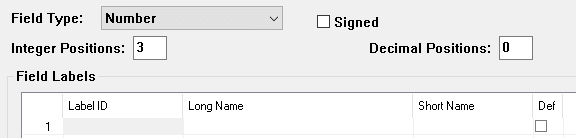
| Field or Control | Description |
|---|---|
|
Integer Positions |
Specify the number of integer positions to the left of the decimal. If the number contains only decimal positions, leave this field blank. |
|
Decimal Positions |
Specify the number of decimal positions to the right of the decimal. If a number contains only integer positions, leave this field blank. In calculations, the system rounds up the result to the number of decimal positions defined here. Note: Number fields cannot exceed 31 positions. Therefore, the sum of integer and decimal positions cannot exceed 31. The field length notation differs between PeopleSoft Application Designer and SQL. If you specify a field length of 8 integer positions and 3 decimal positions in PeopleSoft Application Designer, SQL processes that as a length notation of 11.3. SQL describes field length in terms of precision and scale. Precision is the total number of integer and decimal positions. Scale is the number of decimal positions. Thus, 11.3 means 8 integer positions and 3 decimal positions; 11.0 means 11 integer positions and 0 decimal positions. When you enter 0 in the Decimal Positions field and enter 5 or 10 in the Integer Positions field, the RawBinary format option appears. The RawBinary format converts a number field value to a full-length 16- or 32-bit integer. See the example in the table that follows. |
|
Signed |
Select this check box for a field that is used for arithmetic calculations that might contain a negative value. |
This table shows how the integer position affects the RawBinary storage format:
| Integer Position | Maximum Value | Number Stored As |
|---|---|---|
|
5 |
65535 |
16-bit integer |
|
10 |
4294967295 |
32-bit integer |